Introducing SharpLsp: The .NET LSP Built in Rust

Christian Findlay
Director, Nimblesite
We are done waiting.
The .NET developer experience outside of Windows is broken. Not theoretically — provably, in public, with a 12-to-1 community rejection of Microsoft's closed-source tooling announcement and a retirement post that told Mac developers to run Windows in a VM. SharpLsp is the community's answer: an open-source, editor-agnostic Language Server for C# and F# — built in Rust, powered by Roslyn and FSharp.Compiler.Service. MIT licensed. Zero proprietary dependencies. One install that serves every editor on the machine.
The Situation Is Worse Than You Think
Every option available to a .NET developer today has a disqualifying flaw. Not a quirk — a structural problem that cannot be patched away. Understanding how we got here is important for understanding why SharpLsp had to exist, and why half-measures have failed to fix anything.
For the better part of a decade, .NET developers outside Visual Studio have navigated a fractured, unequal, and increasingly proprietary tooling landscape. OmniSharp was the community's workaround. Ionide was the F# community's workaround. A proliferation of community-maintained LSP configuration snippets for Neovim and Helix — all workarounds. None of them the real thing. Microsoft repeatedly allowed the community to absorb the cost of the problem while retaining control over the solution.
The core issue is structural. Microsoft controls the C# language. Microsoft controls the Roslyn compiler. Microsoft controls the dominant VS Code extension namespace. And Microsoft's commercial incentives are not aligned with giving developers world-class, open, portable tooling. Visual Studio's commercial value depends partly on its platform lock-in. C# Dev Kit's value to Microsoft lies in its ability to grow the VS Code ecosystem — not in being available everywhere.
Visual Studio: Windows Only, Full Stop
Visual Studio remains Windows-only. In August 2023, Microsoft announced the retirement of Visual Studio for Mac, effective August 31, 2024. The official retirement post listed the alternatives for Mac developers who need F#:
"Visual Studio IDE running on Windows in a VM on Mac: This option will cover the broadest IDE needs such as legacy project support for Xamarin, F#, and remote development experiences on iOS by using a virtual machine (VM)."
That is not a workaround. That is Microsoft telling F# developers on Mac to run a foreign operating system inside their computer to write code in their language of choice. On Reddit's r/dotnet, user AbsurdPreferred captured the broader community reaction:
"This is not surprising to me at all. Visual Studio for Mac is horrible and it was clear that MS didn't care about it at all. I hated using it so much that I switched to Rider on Mac. Then loved that so much, I switched to Rider when I do dev work on PC."
User leeharrison1984 added what many had been thinking for years:
"VS for Mac has been a joke for years and severely lacked features that existed in Windows VS for years. In the last few years, if ever I found myself on a Mac and needed to do some C# work, I'm opening VS Code."
The retirement was not a surprise to anyone paying attention. Visual Studio for Mac had always been a second-tier experience — a Xamarin Studio rebranding that never caught up to its Windows counterpart. What was striking was the explicit official advice to run a Windows VM. It confirmed what the ecosystem had quietly accepted: if you are a serious .NET developer on macOS or Linux, Microsoft does not have a compelling story for you.
C# Dev Kit: Closed Core, Enterprise Paywall, VS Code Only
The replacement Microsoft offered was C# Dev Kit. It shipped in 2023 to a hostile reception. In GitHub issue #5276 — the roadmap announcement where Microsoft revealed the extension's LSP host would contain closed-source components — the community pushed back hard.
The announcement itself contained this key line:
"The 'LSP Tools Host' will not be open-sourced, but we plan to communicate with the community along the way to help guide our future plans."
GitHub user GerardSmit articulated the fundamental contradiction:
"I feel like Microsoft has noticed the amount of installs the C# extension has and has to step (aka embrace) in. I feel like VSCode was always about (almost) open-source so this feels like a step in the bad direction. Currently the extension has 16M installs. Will all these installs automatically switch to the closed-source part of the extension?"
User mhmd-azeez proposed the obvious alternative:
"While 'C# in VS Code' getting some love is very much welcome, the new LSP implementation not being open source is a weird decision. I hope Microsoft reconsiders it. If it's about IntelliCode, then they can make the LSP server extensible and open source, with some optional closed source components. GitHub Copilot lives as a separate extension and works everywhere, maybe a similar method can be used for IntelliCode in VS Code too?"
User jasiozet was blunter:
"It's sad and short-sighted when Microsoft tries to jockey for power in the short-run by making user-hostile decisions. This seems like another instance of embrace/extend/extinguish. It's predictable by now, but I'm not happy about it!"
The closed-source core was not the only problem. The C# Dev Kit license contains a hard enterprise restriction that excludes any organization with more than 250 users or more than $1,000,000 USD in annual revenue from using the extension without a paid Visual Studio subscription. That threshold captures most funded startups, mid-sized engineering teams, and profitable small businesses. The extension had 16 million installs at the time of announcement. The overwhelming majority of those users had no idea they were subject to a commercial license restriction.
C# Dev Kit is also VS Code only. It will not work in Neovim, Helix, Emacs, Zed, or any other LSP-capable editor. As user GerardSmit noted in the issue thread: "I assume that Microsoft won't make extensions for these editors." They were right. Microsoft confirmed it — no change to debugger licensing, no support planned for non-VS Code editors. If you live in a terminal-centric workflow, you are simply not the audience for C# Dev Kit.
OmniSharp: The Community's Orphan
OmniSharp was the open-source workhorse that powered the original C# extension for years. It worked across editors, it was MIT licensed, and it was community-maintained — in theory. In practice, as one developer noted in the issue #5276 thread:
"We'll see how much love the open-source LSP server will get but I don't have much hope. This year, JoeRobich and 50Wliu have made the most commits and are both working at Microsoft."
OmniSharp's continued health depends on whether Microsoft employees choose to prioritize it. That is not independence. That is dependency with a community face. When Microsoft's strategic direction shifted toward the new LSP host, development focus shifted with it. OmniSharp is not dead, but it is not where the investment is going.
User codymullins raised the concern that underpins this entire problem space:
"Closed tools all get sunset eventually, then we'll have to port all our code. I've worked at places where my whole job was porting from some closed source language that's no longer supported. Better to do it on your own schedule than be forced to unexpectedly. At least with OmniSharp there was a plan b — it wasn't great but it existed."
Rider: Excellent but Proprietary
JetBrains Rider is the best IDE available for .NET outside of Visual Studio on Windows. That is a genuine compliment — Rider has genuinely excellent F# support, a fast project loading experience, and a UI that cross-platform .NET developers have voted for with their wallets. As one r/fsharp user put it:
"The F# intellisense experience in Rider is rock-solid. Rivals Visual Studio. F# feels like a first-class citizen in Rider." — Jwosty, r/fsharp
And user yankun0567 on r/dotnet stated the obvious conclusion:
"Regarding that VS (not Code!) is Windows only, but .NET is cross-platform — it is no surprise that a cross-platform IDE catches up."
But Rider requires a paid commercial license. It is closed-source. Your workflow depends on JetBrains keeping it commercially viable and maintaining favorable pricing. User ffffrozen on the VS for Mac retirement thread expressed the wish many developers share:
"If Rider had a one-off purchase, I'd buy it in a heartbeat."
The broader point is not that Rider is bad. It is that a proprietary IDE is not a durable answer for an open ecosystem. The .NET runtime is open. The C# compiler is open. The F# compiler is open. The Language Server Protocol is open. The editor tooling should be open too.
What We Have Built
SharpLsp is not a promise. It is working software. The VS Code extension is the first editor integration, but the architecture is deliberately editor-agnostic from day one — a single sharplsp binary on $PATH that any LSP-capable editor can launch.
The key architectural insight is that we do not reimplement what the compilers already know. We call them. Roslyn for C#. FSharp.Compiler.Service for F#. Everything semantic — completions, diagnostics, hover, go-to-definition, rename — comes from the actual compilers via a thin IPC bridge. We own the LSP protocol layer, the virtual file system, and the syntax-level features via tree-sitter. The compilers own correctness. This is not a compromise. It is the correct design.
Solution Explorer
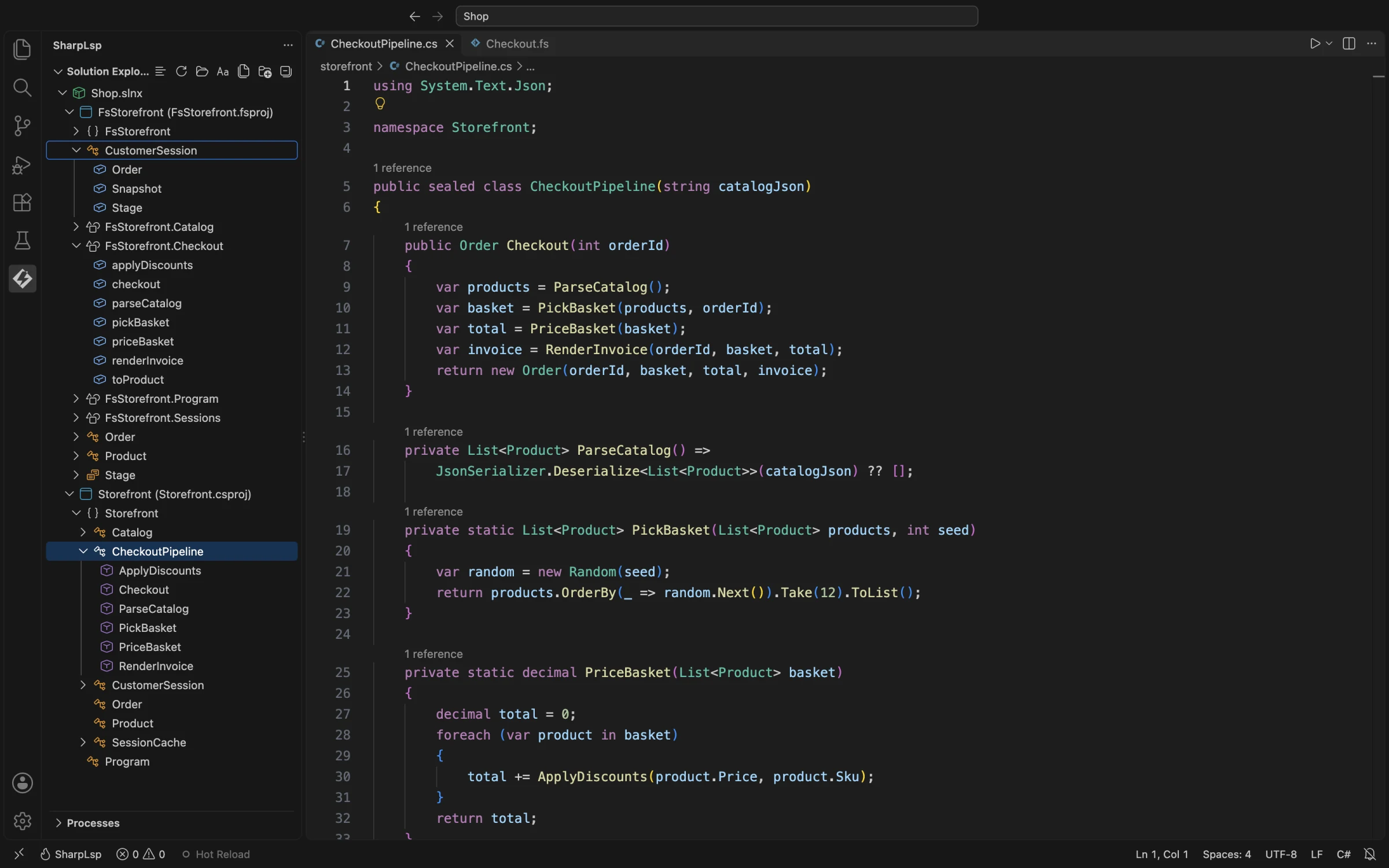
The first thing you see when you open a .NET workspace in SharpLsp is a proper Solution Explorer. Not a file tree — a .sln-aware hierarchy that understands projects, namespaces, and types, the way Visual Studio does, but available on every platform in every editor. The tree is built from the actual MSBuild project graph, not guessed from folder structure. It knows the difference between a project reference and a NuGet dependency, and it reflects that in the sidebar.
This matters more than it sounds. Visual Studio's Solution Explorer has been the mental model for .NET projects since 2002. It represents how .NET developers think about their code — not as files in folders, but as types within namespaces within projects within solutions. Senior engineers who move between Visual Studio on Windows and any other tool on macOS or Linux feel the loss of this model acutely. Every file-tree-based alternative forces a context switch. SharpLsp refuses that context switch. The solution hierarchy is the primary navigation surface, derived directly from MSBuild, and it stays in sync as you edit.
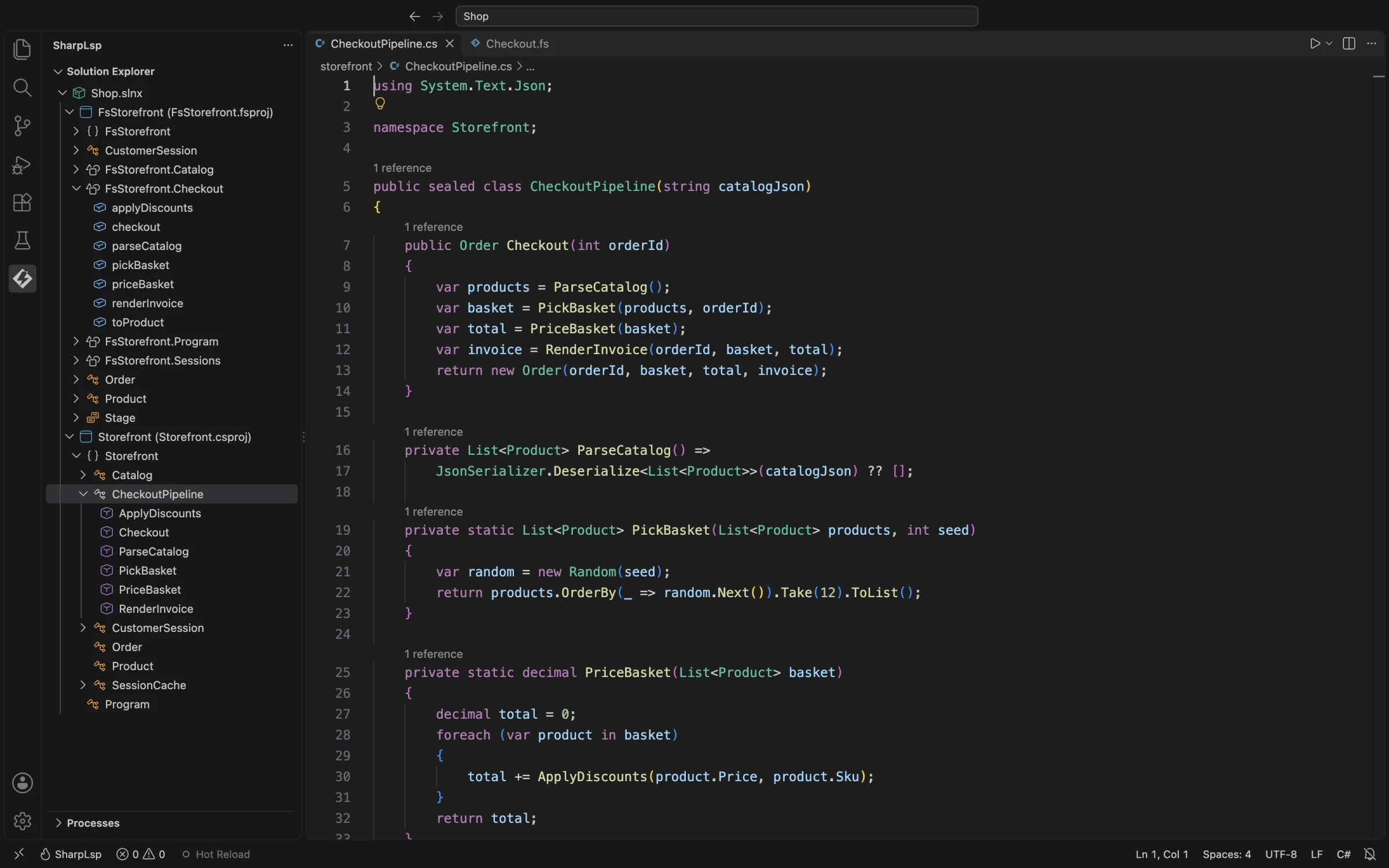
The tree also reflects type-level structure. Namespaces expand to show types. Types expand to show members. Reference counts appear inline on each node, giving you a continuous ambient signal about what is used and what might be dead code — without having to run an explicit Find All References query on every symbol you are curious about. When the solution changes on disk — a new file added, a project reference modified — the tree updates without requiring a restart.
Code Folding
Code folding in most editors is line-range-based — a blunt instrument that folds from open brace to close brace without understanding what it is folding. SharpLsp's folding is tree-sitter powered, which means it understands the syntactic shape of the code. Namespaces, types, methods, and expression blocks all fold independently and correctly.
The fold ranges are computed entirely in the Rust host without any round-trip to the compiler sidecars. This means they resolve in under one millisecond regardless of whether the workspace has finished loading or whether the compiler is in the middle of a background build. Folding is structural information, not semantic information — and SharpLsp treats it as such, routing it to the fastest possible handler.
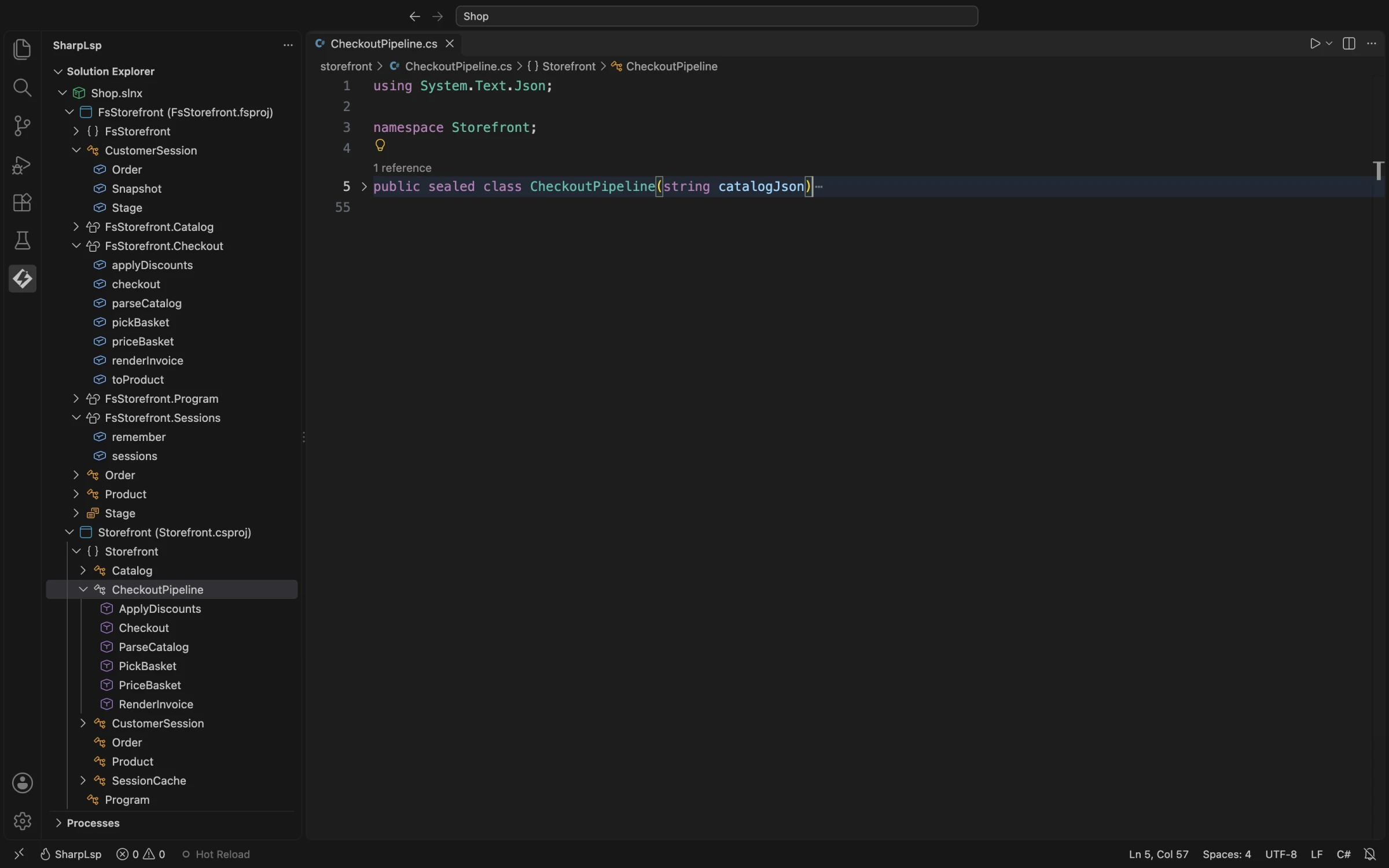
For engineers working in large files — generated code, domain models, protocol buffer implementations — the ability to fold at the type level rather than the line level is the difference between a navigable file and one that requires constant scrolling. SharpLsp's tree-sitter grammar for C# handles all standard folding patterns, including regions (for compatibility with legacy codebases that use them), doc comment blocks, and multi-line LINQ expressions.
Completions
Completions pull from the full Roslyn semantic model — the same CompletionService that powers Visual Studio. That means import completions for types not yet in scope, extension method resolution, constructor overloads, named argument suggestions, and filtering by accessibility modifier. The completion list is not a token frequency guess; it is a Roslyn query against the actual compiled project graph.
When you type a type name that is not yet imported, SharpLsp surfaces it with an auto-import suggestion. When you type ., you get the full member list including inherited members and extension methods from all imported namespaces. When you are in a LINQ chain, the completion context is aware of the element type and filters accordingly. This is what Roslyn knows — and SharpLsp exposes all of it directly.
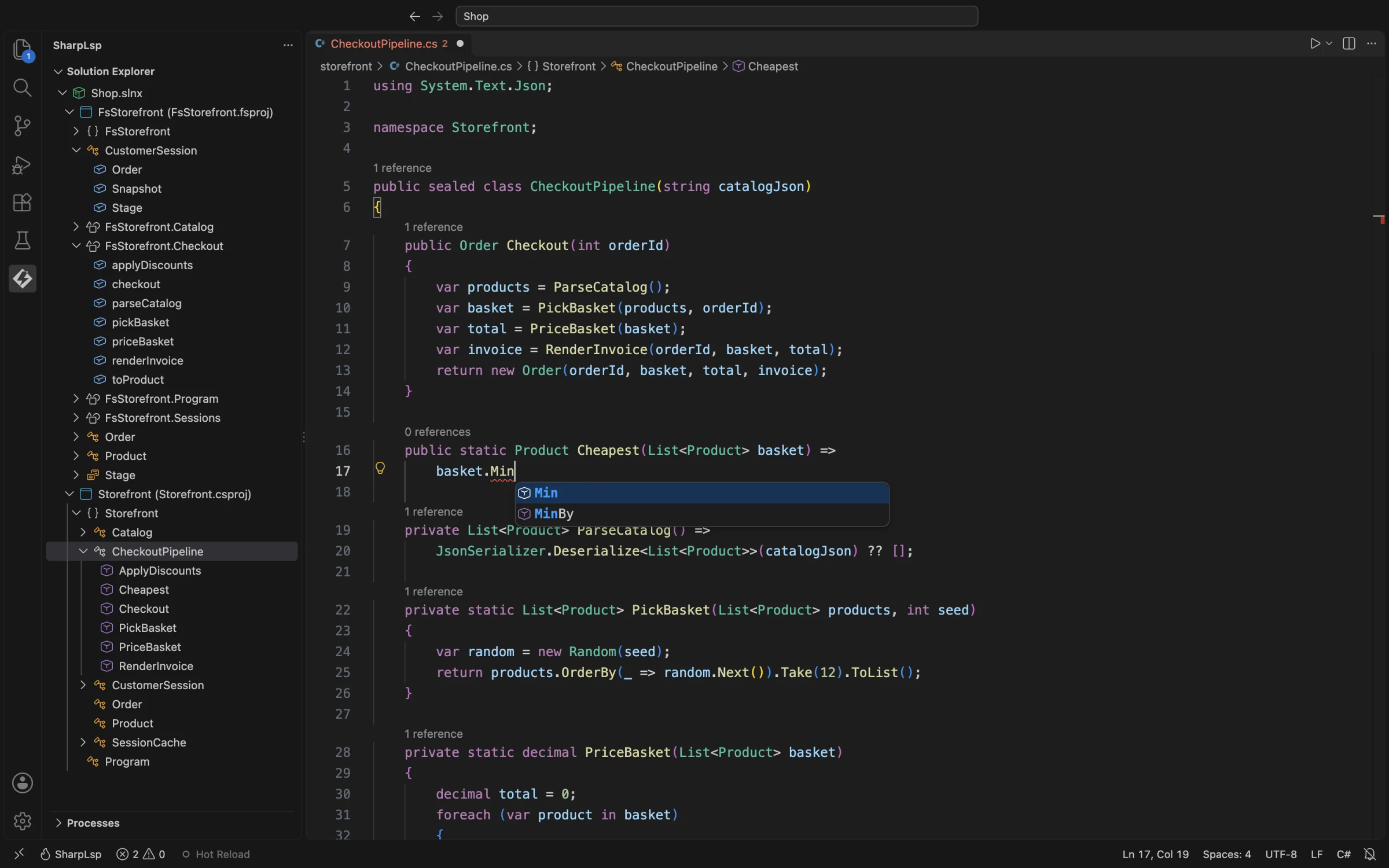
Completion latency targets are under 100ms at the 50th percentile and under 200ms at the 95th percentile. Achieving these targets requires careful management of the sidecar request lifecycle: coalescing in-flight requests when the user continues typing, cancelling stale completions that are no longer relevant, and debouncing the sidecar round-trips intelligently to avoid thrashing the compiler with overlapping requests for the same document position. The current implementation hits these targets in testing against a fifteen-project solution on an M2 MacBook Pro.
Hover and XML Doc
Hover shows the full method or type signature alongside its XML documentation — parameters, return value description, remarks, exceptions, and examples. This is rendered from the XML doc comments in your source or from the documentation embedded in NuGet packages when hovering over third-party APIs. Roslyn's DocumentationCommentCompiler surfaces all of this, including inherited documentation from base classes and interface implementations.
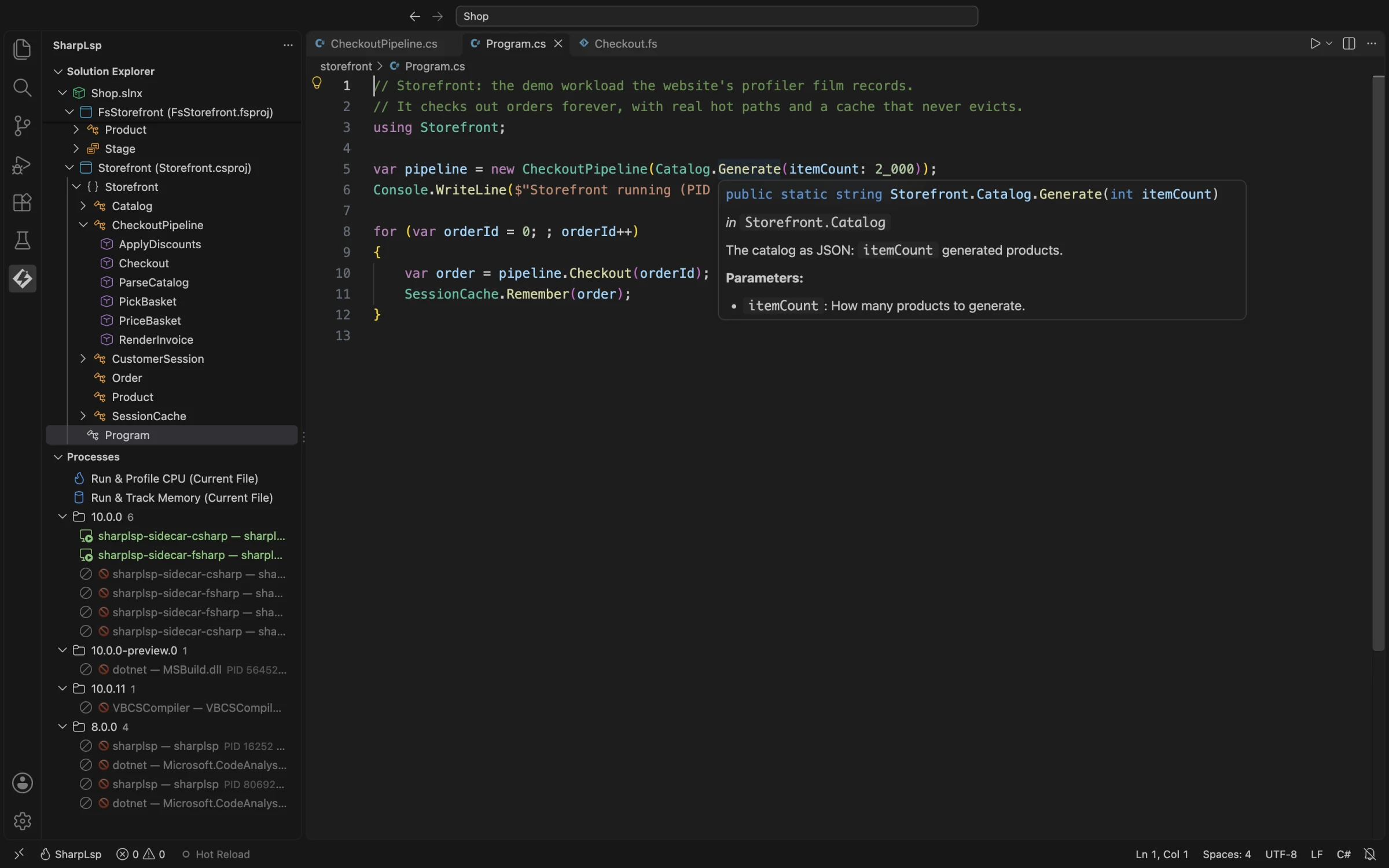
The Profiler panel visible in the sidebar is not incidental decoration. SharpLsp surfaces all running .NET processes on the machine, so you always know what is executing. When you are tracking down a performance regression or verifying that a service has actually stopped, this ambient process list is immediately useful — you do not have to open Activity Monitor or run ps aux | grep dotnet.
For F#, hover is structurally more important than it is for C#. Because F# code relies heavily on type inference, the types of bindings are often not written explicitly in source. In a deeply nested pipeline of |> operators, the type of each intermediate expression is inferred by the compiler — and it is the only authoritative source of that information. FSharp.Compiler.Service's GetToolTip API surfaces these inferred types, and SharpLsp renders them with the same priority and formatting as C# hover results. Hovering over an F# binding shows you its full inferred type, which is often the only documentation that exists.
Go to Definition
Go to Definition navigates across the full solution graph — through project references, into types defined in other assemblies, and into NuGet packages using decompiled sources when no PDB is available. The breadcrumb bar tracks your position in the type hierarchy at all times, so you always know where you landed after a jump and can navigate back through the history of where you have been.
This is not a text grep or an index lookup. It is a Roslyn symbol resolution — the same mechanism Visual Studio uses internally. It handles partial classes, source generators, and nested types correctly because Roslyn's workspace model accounts for all of them. When you press Go to Definition on a symbol defined in a source generator, SharpLsp navigates to the generated source — not the generator implementation. When you navigate into a BCL type, the C# sidecar decompiles the metadata using ICSharpCode.Decompiler and returns the reconstructed source code.
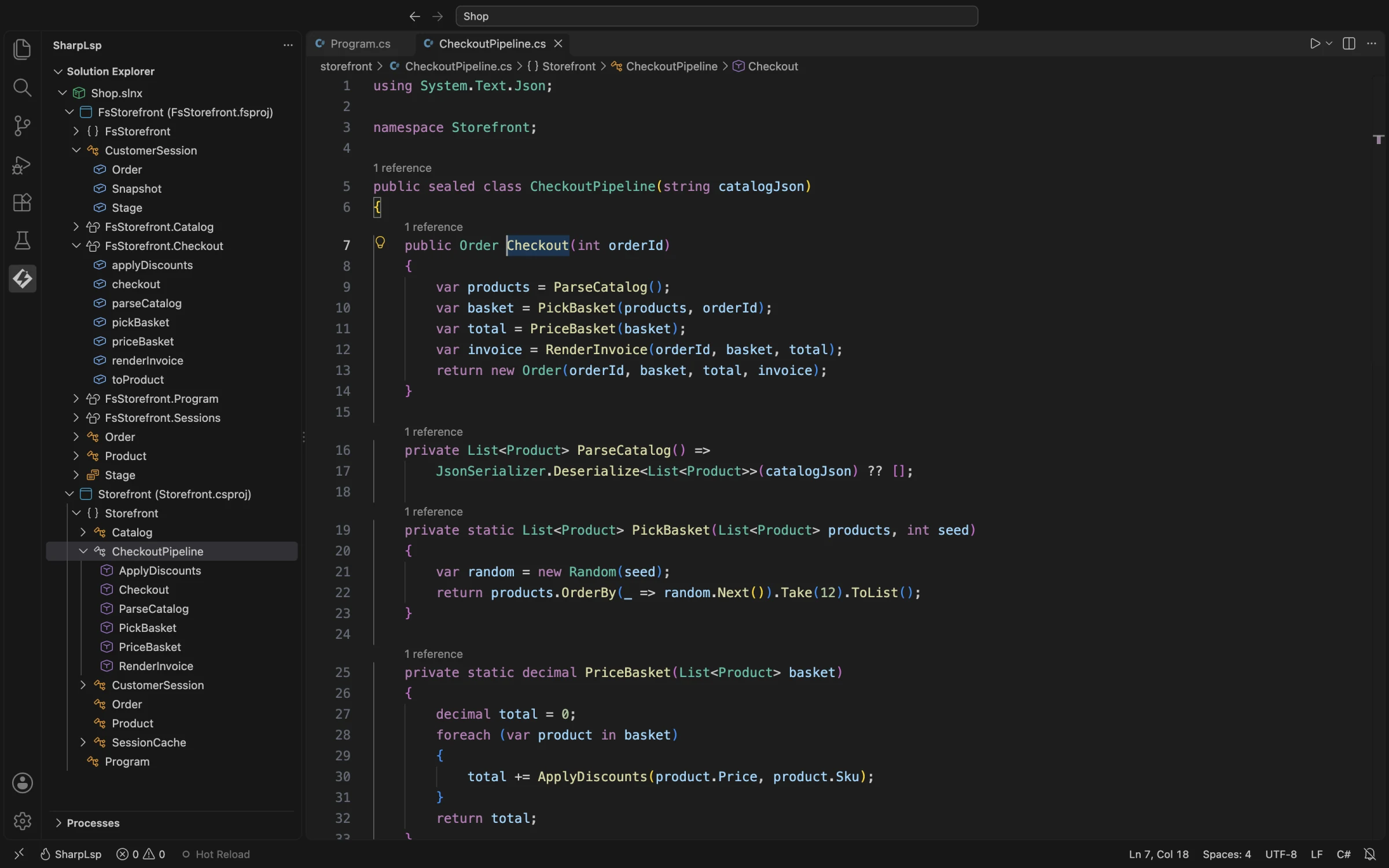
Go to Definition into decompiled metadata — navigating into System.Collections.Generic.List<T> and seeing the implementation — has historically been available only in Visual Studio and Rider. It is one of the features that made those tools worth paying for, because it eliminates the need to keep a browser tab open to docs.microsoft.com while reading unfamiliar code. SharpLsp delivers this in every editor that runs the binary.
The Solution Explorer reflects the same structural understanding. Deeply nested types — inner classes, nested enums, compiler-generated state machine types from async methods — all appear in the correct position in the hierarchy, with reference counts shown inline.
Diagnostics
Diagnostics come from the real Roslyn compiler — not approximations, not tree-sitter heuristics, not regex over source text. Every error and warning you see is a genuine Roslyn diagnostic from a fully loaded MSBuildWorkspace. The same analysis engine that determines whether your code compiles is the one producing the diagnostics panel.
SharpLsp uses the LSP 3.17 pull-diagnostics model, which means diagnostics are only computed when the editor requests them. They are never pushed speculatively during workspace load — when the project graph is incomplete and packages are not yet restored. This solves the "phantom error" problem that has plagued C# tooling in VS Code for years. Anyone who has opened a large solution in OmniSharp and watched hundreds of CS0246 errors appear and then disappear as packages loaded knows exactly why this matters.
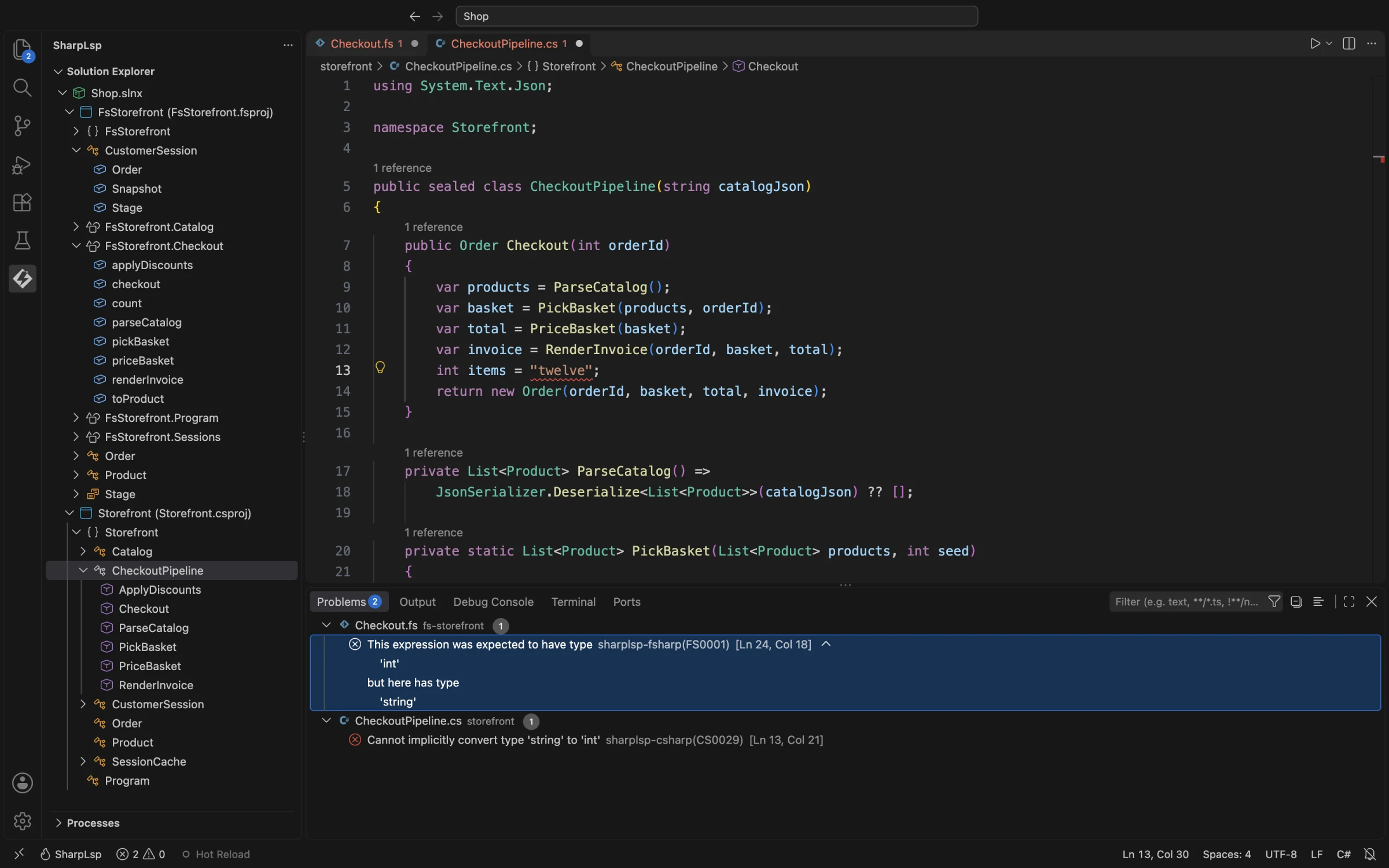
The NuGet restore gate runs before MSBuildWorkspace opens the solution. SharpLsp detects missing package restore state, runs dotnet restore automatically, and only then begins serving semantic requests. The first-open experience takes slightly longer than immediately returning empty state, but every diagnostic that appears is real — there are no red squiggles that exist only because the workspace has not finished loading. This is the behavior .NET developers expect and have historically only gotten in Visual Studio or Rider, where the build system integration ensures packages are present before the IDE begins analysis.
Quick Fixes and Refactoring
Code actions come from Roslyn's own CodeFixProvider and CodeRefactoringProvider implementations — the same providers that power Visual Studio's lightbulb menu, refined over a decade of production use against billions of lines of C# code. Remove unused variable, add missing using, implement interface, rename symbol, extract method — all of these work because SharpLsp is calling the same APIs, not reimplementing them from scratch.
This also means third-party Roslyn analyzers work automatically. If your project references a Roslyn analyzer NuGet package — StyleCop, Roslynator, ErrorProne.NET — its diagnostic rules and code fixes appear in SharpLsp's action menu without any additional configuration. The analyzer pipeline is the same one Roslyn runs during compilation.
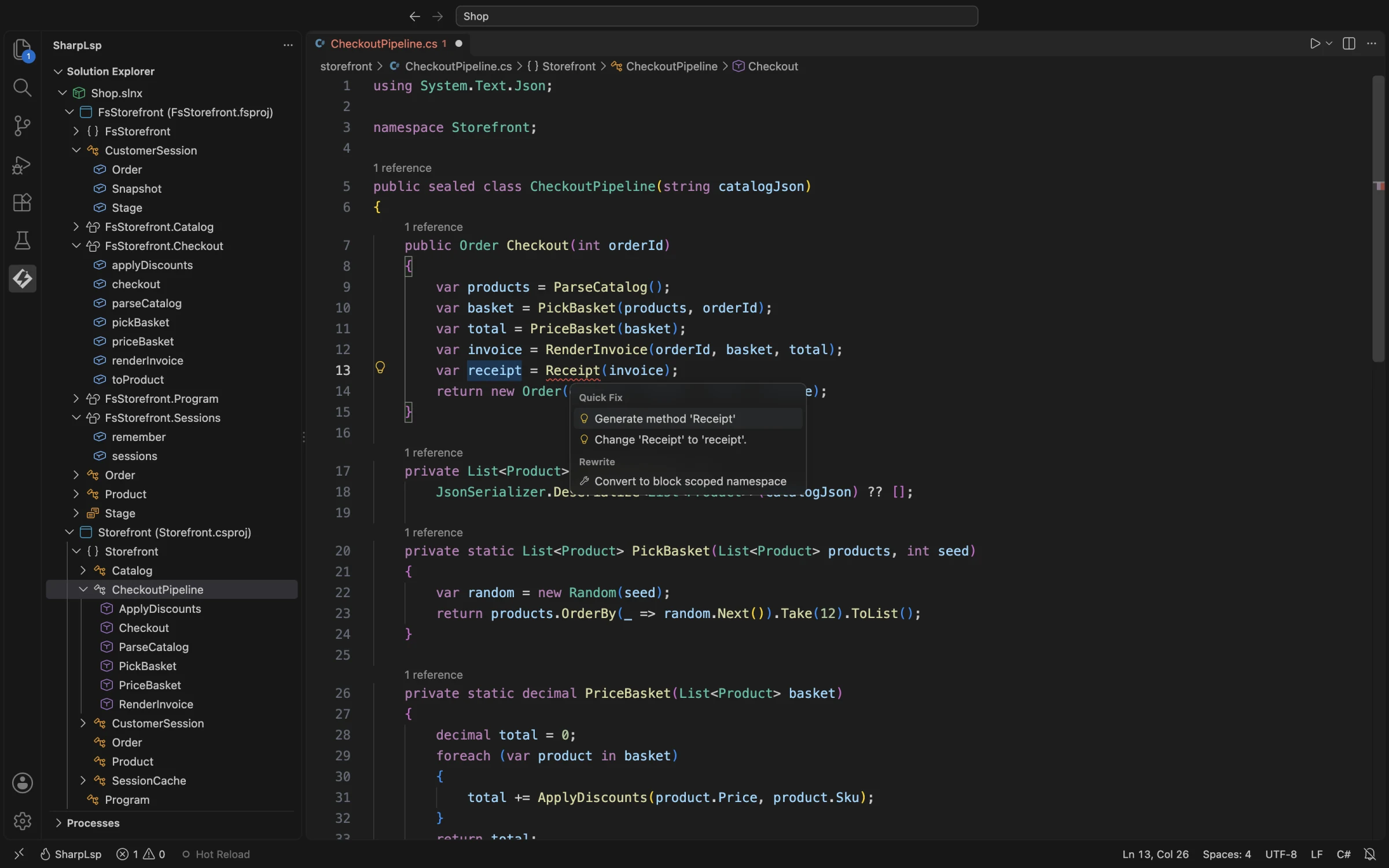
The list of available code actions in any given context is identical to what Visual Studio would offer in the same context, because the code path from "cursor position and diagnostic span" to "available actions" is identical. We pass the document, position, and diagnostic context to Roslyn's CodeFixContext. Roslyn does the rest. Feature parity with Visual Studio's refactoring menu is not an aspiration — it is a consequence of the design.
Project Context Menu
Right-clicking a project in the Solution Explorer gives you build, rebuild, clean, NuGet browsing, and project reference management — all wired up and working. These are not thin wrappers around shell commands; they go through the SharpLsp server, which means they are aware of solution state and can update the project graph when references change.
Build output appears in a dedicated panel, not mixed with LSP logs. Errors from the build link back to the source location in the editor, the same way Visual Studio's Error List does. When you add a project reference through the context menu, the MSBuildWorkspace is updated to reflect the new dependency, and the Solution Explorer tree updates to show the reference without requiring a full restart.
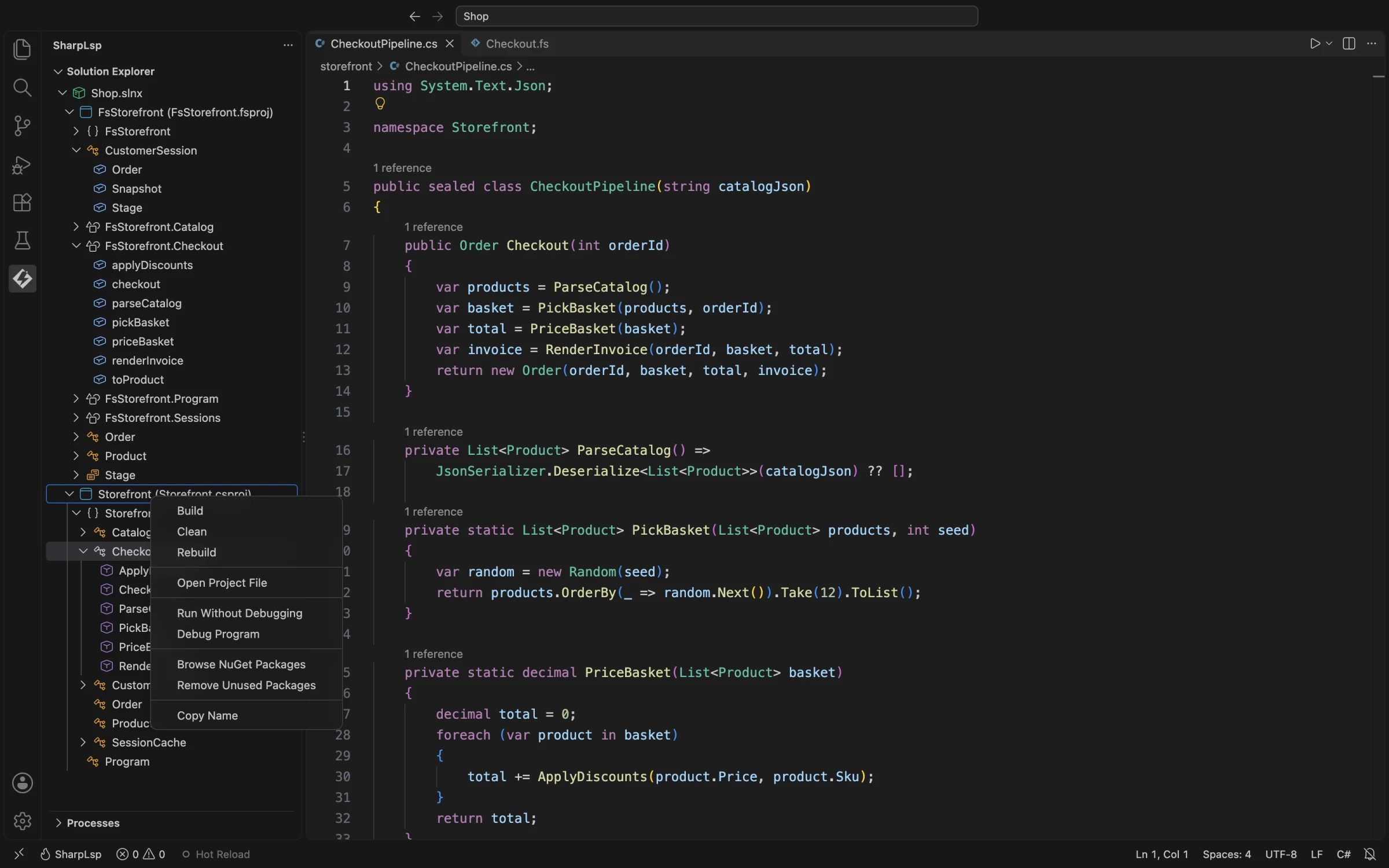
Project file mutations go through Microsoft.Build.Construction — the MSBuild document model API. This is not string manipulation. When SharpLsp adds a <PackageReference> element, it is inserted into the project file's XML DOM at the correct position, formatted consistently with the existing file, and serialized back without disturbing whitespace or comments. This is a hard rule: SharpLsp never hand-manipulates structured files.
NuGet Management
The NuGet panel is a full package browser. Search nuget.org (or any configured package source via nuget.config), browse available versions, see what is currently installed, inspect package metadata — all without leaving the editor or opening a terminal. The search results pull live from the NuGet v3 API, returning packages with download counts, license identifiers, and version lists.
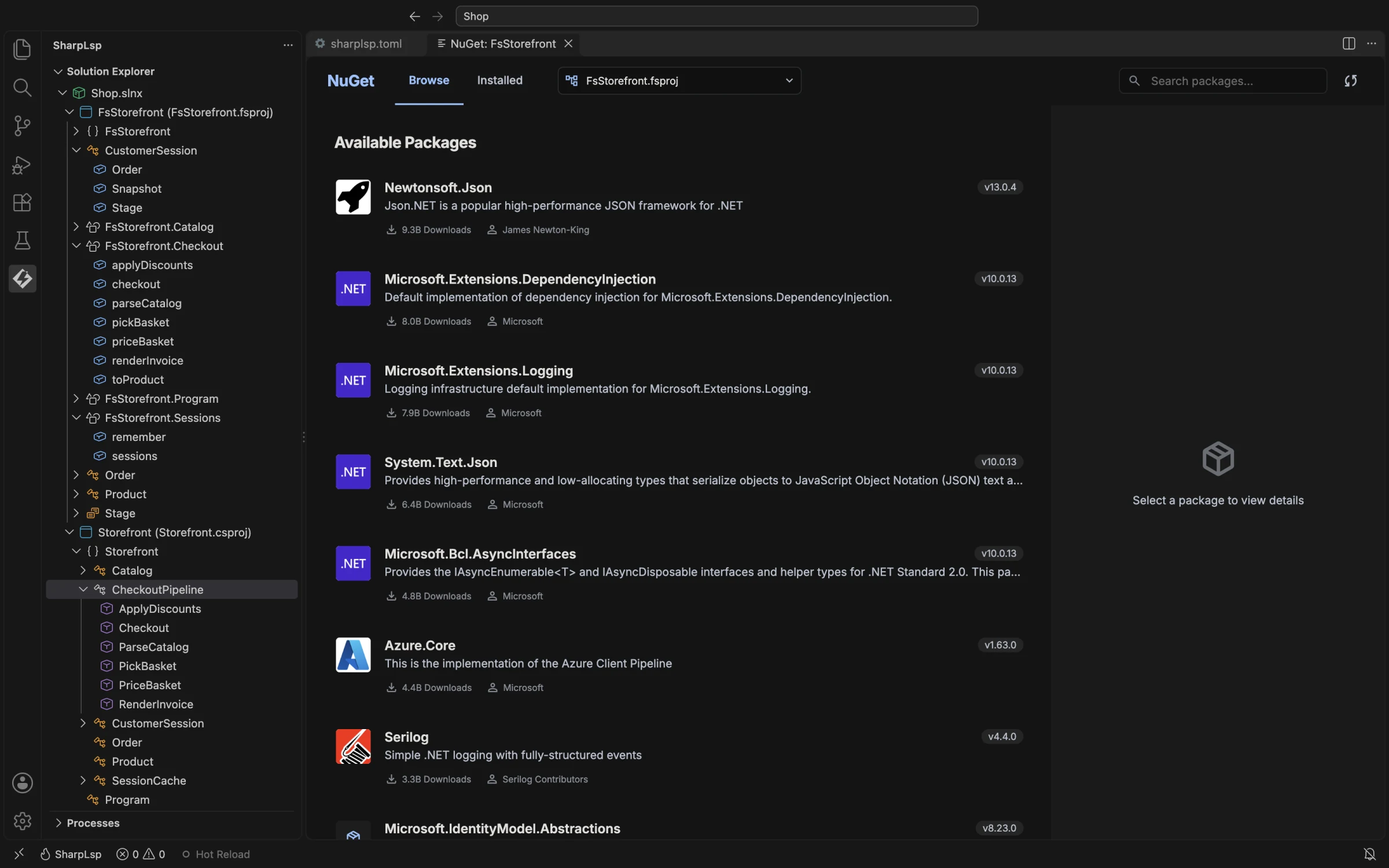
Package management has always been a friction point for .NET developers in editors other than Visual Studio. The VS Code workflow typically involves either using the terminal (dotnet add package Serilog) or editing the .csproj by hand and waiting for a restore. Neither is as fast as a search-and-click UI with immediate feedback. SharpLsp brings that UI to every editor.
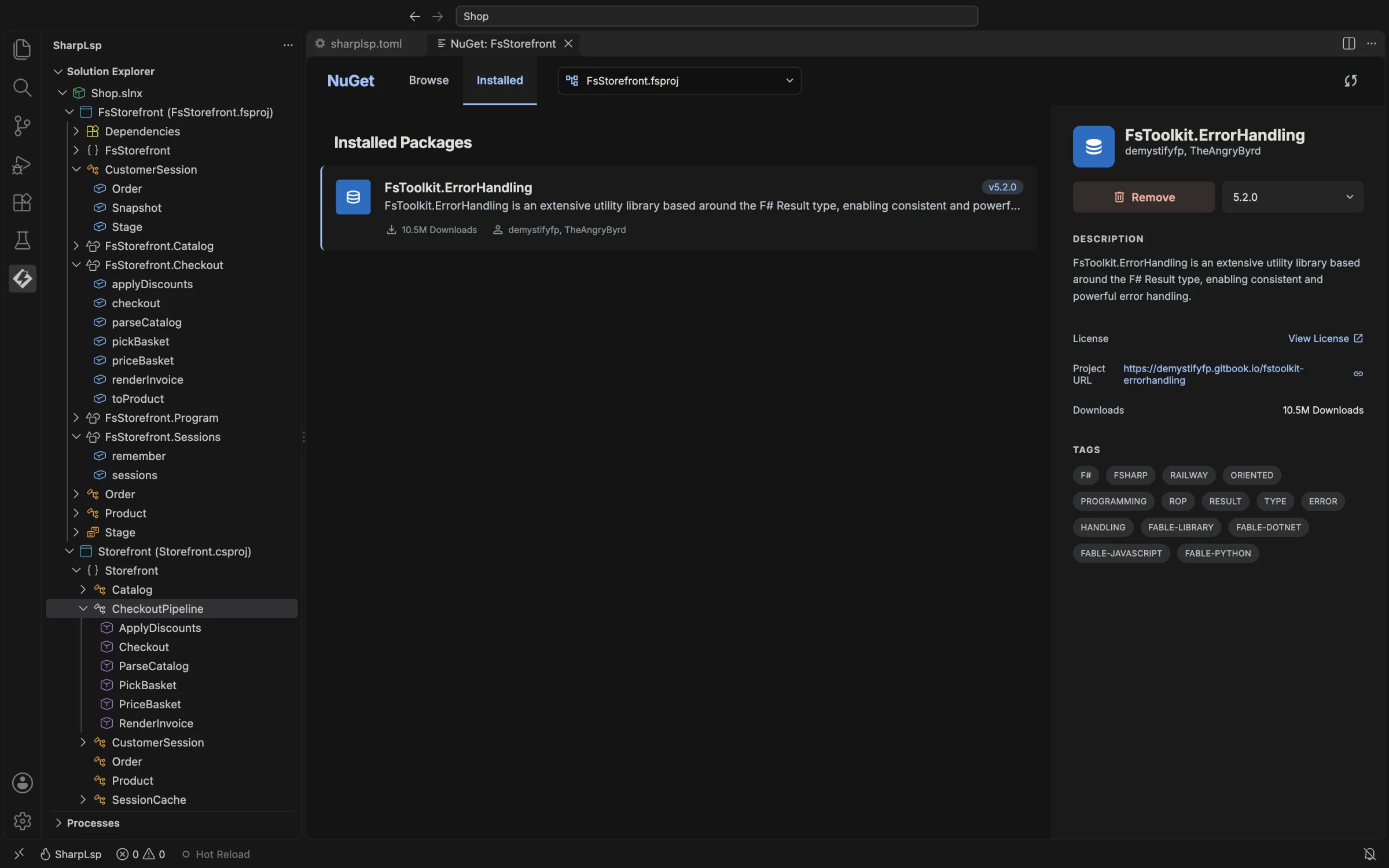
The installed packages view derives its data from the MSBuild project graph — specifically the PackageReference items resolved through the NuGet restore graph. This means it reflects the actual state of the project file, not a UI-side cache. If you add a package through the terminal and then open the panel, the new package is there. If you edit the .csproj directly, the panel reflects the change on next refresh.
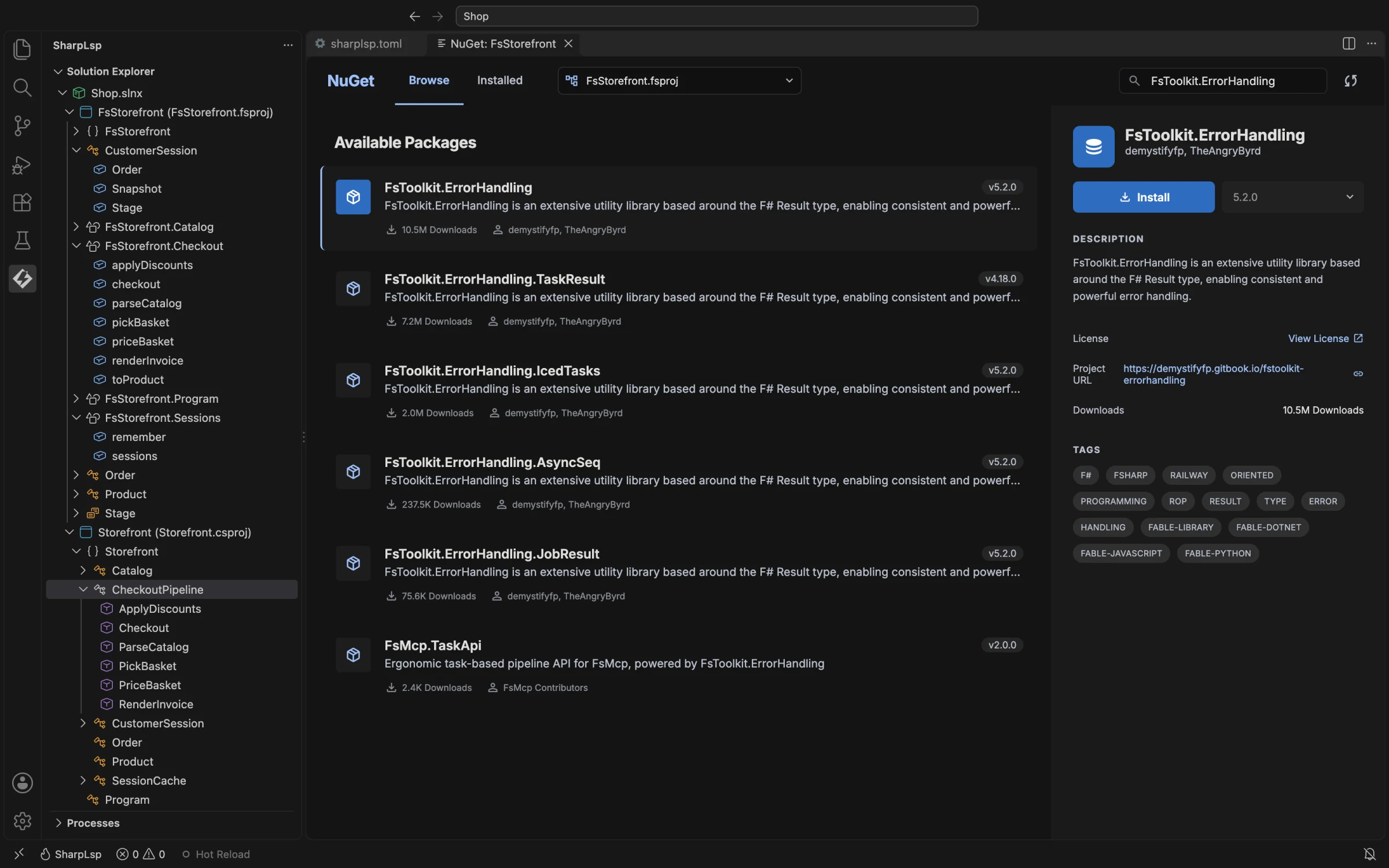
Package details include SPDX license identifiers, project URLs, author information, and the full version history for the package on the configured feed. This is the level of detail available in Visual Studio's NuGet Package Manager, now available in every LSP-capable editor through a single shared server process.
The Architecture
SharpLsp is a three-tier system. The Rust host owns the LSP connection, the virtual file system, and all syntax-level work via tree-sitter. Two long-running .NET sidecar processes handle semantic analysis — one for C# via Roslyn, one for F# via FSharp.Compiler.Service.
The decision to build the host in Rust is not a novelty choice. Rust gives us a zero-cost async runtime via tokio, fearless concurrency for the multi-editor shared-server scenario, and a binary that starts in under 50ms and consumes negligible memory before the sidecars connect. The host processes LSP messages, manages the virtual file system, routes requests, and handles tree-sitter parsing — all without touching the heap in ways that would interfere with the garbage-collected sidecar processes.
The decision to keep semantic analysis in .NET is equally deliberate. Roslyn is a managed runtime library. FSharp.Compiler.Service is a managed runtime library. Both are sophisticated, well-maintained implementations of their languages with decades of engineering behind them, and reimplementing them in any other language would be insane. We call them instead. The sidecars are long-running .NET processes that load the full MSBuildWorkspace, maintain the in-memory compiler state, and respond to IPC requests from the Rust host.
The IPC between Rust and the sidecars uses MessagePack over Unix domain sockets (named pipes on Windows), framed with a 4-byte little-endian length prefix. Round-trip IPC overhead runs consistently under 200µs in local benchmarks, meaning the bottleneck is always the compiler operation — not the transport. Total round-trip overhead target, including IPC: under 500µs excluding compiler work.
Syntax-only requests — document symbols, folding ranges, selection ranges — are handled entirely in the Rust host using tree-sitter. They return in under 5ms regardless of solution size. Semantic requests go to the sidecars and are coalesced with a 150ms debounce window. Stale in-flight requests are cancelled when superseded by newer versions of the same document.
| Category | Handler | Latency Target | Examples |
|---|---|---|---|
| Syntax-only | Rust (tree-sitter) | <5ms | documentSymbol, foldingRange, selectionRange |
| Semantic | Sidecar (Roslyn/FCS) | <200ms | completion, hover, definition, references |
| Hybrid | Rust + Sidecar | <100ms | semanticTokens |
| Cached | Rust (salsa) | <1ms | Repeat requests for unchanged documents |
All SharpLsp binaries live in one central location on the machine. sharplsp on $PATH is all any editor needs. Editor extensions are thin clients that launch the system binary — they contain zero bundled executables. One install serves VS Code, Neovim, Helix, Zed, and every other LSP-capable editor simultaneously.
Update (October 2026): the VS Code extension now bundles the host, both sidecars, and the debugger in a per-platform VSIX for a zero-setup install. Every other editor uses the standalone
sharplsparchive published with each release.
This resolves one of the more absurd aspects of the current ecosystem: every editor extension bundles its own copy of the language server binary. The OmniSharp VS Code extension ships a bundled OmniSharp binary. The Ionide extension ships its own build of the F# language server. These binaries are downloaded per-extension, per-editor, per-machine. They do not share a process. They do not share a cache. A developer using VS Code and Neovim simultaneously against the same solution would theoretically be running two separate instances of OmniSharp — each maintaining its own copy of the Roslyn workspace in memory. SharpLsp runs one process per solution, shared by all editors on the machine.
F# Is Not an Afterthought
Microsoft's retirement post told F# developers on Mac to run a Windows VM. C# Dev Kit has no F# support. The Language Server Protocol announcement in issue #5276 did not mention F# once. OmniSharp's F# story has always been secondary. The community has accepted this for years because there was no alternative. SharpLsp refuses to accept it.
The state of F# tooling outside Windows and Rider has been a persistent source of frustration that has measurably slowed the language's adoption. A Reddit thread on r/fsharp — titled "Editing F#: A big issue preventing adoption and onboarding" — summarized the case in 2019 and it remains accurate today. User flubahdubah wrote:
"I'm here to make the argument that fixing the editor tooling should be a higher priority item to fix for the F# team, ahead of some of the current release items that (while appreciated and important) do not fix as large of an issue. We use editor tooling in every single programming task — versus a language feature which might only be present in certain programming tasks. Having a base set of reliable editing features can signal the maturity of a language's ecosystem."
An anonymous commenter in the same thread identified something structurally important about F# and type inference:
"Another issue is that since most F# code uses type inference so heavily, it's even more important than normal to have an editor with IDE features, so you can tell what types things are. Code you wrote a long time ago, or someone else's code, that doesn't have type annotations is completely impenetrable without a code editor that can show you the types in some way, and let you hop to definition."
This is why F# editor quality is not just a quality-of-life issue — it is a correctness issue. Without accurate type display on hover, F# code that relies heavily on inference is genuinely hard to read and maintain. The editor is not a convenience; it is the documentation. When the editor is slow, crashes under load, or loses track of types after a file change, the language itself becomes less accessible.
User bozhidarb in a recent r/fsharp editor thread described the broader problem clearly:
"I'm not sure the support for F# in NeoVim is very good — I played with OCaml there and the indentation was quite broken when using TreeSitter. I checked Helix briefly and the support story there wasn't very good either. That's a big problem with smaller communities — the languages are great, but the support for them in editors is all over the place."
And user verdadkc in the F# tooling state thread described the onboarding barrier that the current situation creates:
"Learning a new language is the fun and easy part. Learning a new tooling ecosystem is daunting and tedious. I would love to see a course on .NET for people who are entirely new to .NET and have no intention of ever using Visual Studio."
SharpLsp addresses this directly. C# and F# share the same infrastructure tier. They hit the same feature targets. They are tested to the same standard. F# is not a bolt-on — it is a first-class target from day one.
The F# sidecar runs FSharp.Compiler.Service with SharpLsp's own project-options loader and Fantomas for formatting. F#-specific features — pipeline type hints (inline display of intermediate types in |> chains), union case generation, record stub completion, computation expression completions, file ordering awareness in .fsproj, and .fsx script support with NuGet reference completions — are on the roadmap as first-priority items, not future nice-to-haves.
The bar we are building to is the one Jwosty described of Rider's F# support on r/fsharp:
"The F# intellisense experience in Rider is rock-solid. Rivals Visual Studio. F# feels like a first-class citizen in Rider."
We are building that, in open source, for every editor on every platform. When we add a new feature, F# gets it at the same time as C#.
Why Open Source Ownership Matters
The community's frustration with the #5276 announcement was not abstract ideology about open source. It was about control — specifically, the loss of the ability to predict what your tooling will do next, fork it when it breaks, or migrate away when the vendor changes direction. As codymullins put it in the thread:
"Closed tools all get sunset eventually, then we'll have to port all our code. I've worked at places where my whole job was porting from some closed source language that's no longer supported. Better to do it on your own schedule than be forced to unexpectedly."
The pattern repeats across the industry. A commercial vendor offers excellent tooling. The community grows dependent on it. The vendor changes pricing, changes licensing terms, sunsettings a feature, or pivots the product direction. The community scrambles. This happened with Visual Studio for Mac. It happened with Xamarin. It happened with .NET's cross-platform story generally before the community pressure behind .NET Core forced Microsoft's hand.
Open source is not a guarantee of quality — OmniSharp had bugs too. But it is a guarantee of continuity and control. When the source code exists and is MIT licensed, the community can fork it, maintain it, improve it, and integrate it into other tools without permission. No single company can deprecate it overnight.
SharpLsp is MIT licensed. The full source is on GitHub. There are no closed-source components, no enterprise license restrictions, no Microsoft account requirements. No organization of any size is excluded from using it commercially. There is nothing to sign.
What Is Next
Phase 2 is underway: full semantic analysis for both languages. That means completions, hover, go-to-definition, find-references, diagnostics, rename, and semantic tokens — all working against real MSBuildWorkspace-loaded solutions for C# and FCS-loaded projects for F#.
After that: code actions and refactoring (Phase 3), test discovery and debugging (Phase 4), and eventually features no other open-source tool has offered — cross-language navigation between C# and F# projects in the same solution, architecture analysis, AI-assisted code actions via MCP (Phase 5).
The cross-language navigation feature deserves particular mention. In a real-world .NET solution, it is common to have C# and F# projects side by side — an F# domain model library consumed by a C# ASP.NET Core API, for example. Go to Definition on a C# call into an F# type currently drops you at a metadata stub in every open-source tool. SharpLsp will resolve the definition across the language boundary, routing the request to whichever sidecar owns the target file, and returning the actual F# source location. This has never been done in an open-source LSP implementation.
The full roadmap is in the technical specification. The code is on GitHub.
SharpLsp exists because .NET developers deserve world-class tooling that is not gated behind proprietary licenses, vendor lock-in, or single-editor coupling. The community has been building workarounds for over a decade. We are done building workarounds. Come help build the real thing.