Profiler
SharpLsp profiles CPU and memory for any running .NET process without leaving VS Code. Hot lines light up in your code, a flame graph and hot-function table land beside it, and a live heap timeline ranks leak suspects while the app runs. You don't install dotnet-trace, you don't take dumps, and you don't need a license.
How It Works
The profiler runs inside the SharpLsp host, not in either language sidecar, so a sidecar restart never ends a session. The extension ships a small .NET engine beside the sharplsp binary. The engine attaches to the target through the runtime's diagnostics channel (EventPipe):
- CPU sampling and heap snapshots both work on a process that is already running.
- You don't restart the app or rebuild it.
- The engine needs no debugger entitlement, so the memory profiler works on macOS too.
The engine needs a .NET 8 or later runtime. A process started with DOTNET_EnableDiagnostics=0 cannot be attached.
Processes
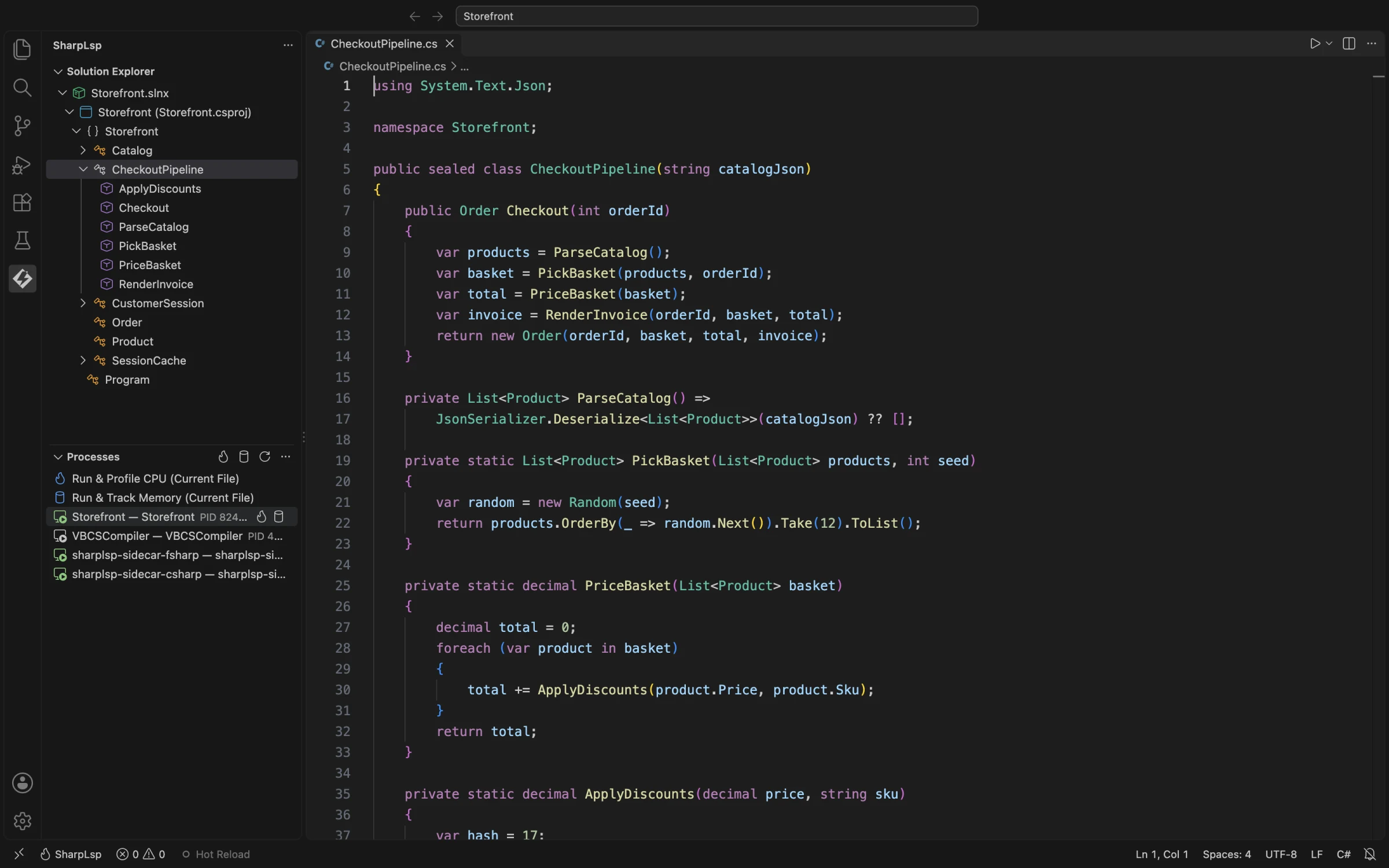
The Processes view in the SharpLsp sidebar finds .NET processes on the machine. Each row shows the PID, runtime version, CPU use and memory, and processes from the open workspace are highlighted. Hover a row for its inline actions:
- Profile CPU attaches the sampler.
- Track Memory starts heap tracking.
The row's context menu adds Copy PID, Reveal Entry in Editor and Kill Process. The view's toolbar has three more entry points:
- Run & Profile CPU (Current File) and Run & Track Memory (Current File) launch the current project under the SharpLsp debugger and profile it from launch.
- Refresh, Sort, Group and Filter organise the process list.
CPU Profiling
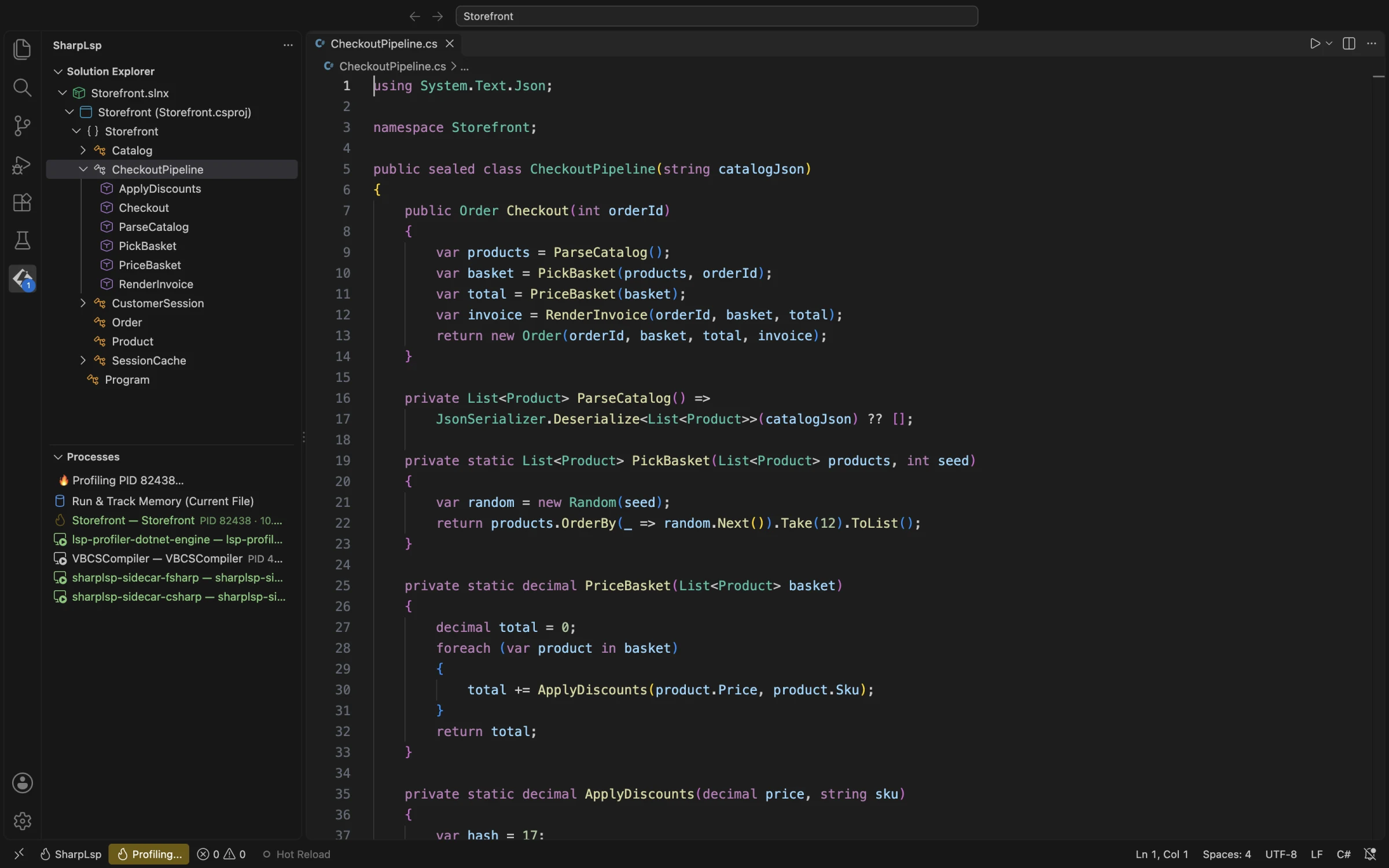
Click Profile CPU on a row, or run SharpLsp: Start Profiling (Ctrl+Alt+P, Cmd+Alt+P on macOS). Let the app run through the slow path, then run SharpLsp: Stop Profiling (Ctrl+Alt+Shift+P, Cmd+Alt+Shift+P on macOS) or click the status bar item. SharpLsp: Take Profile Snapshot shows results so far without stopping.
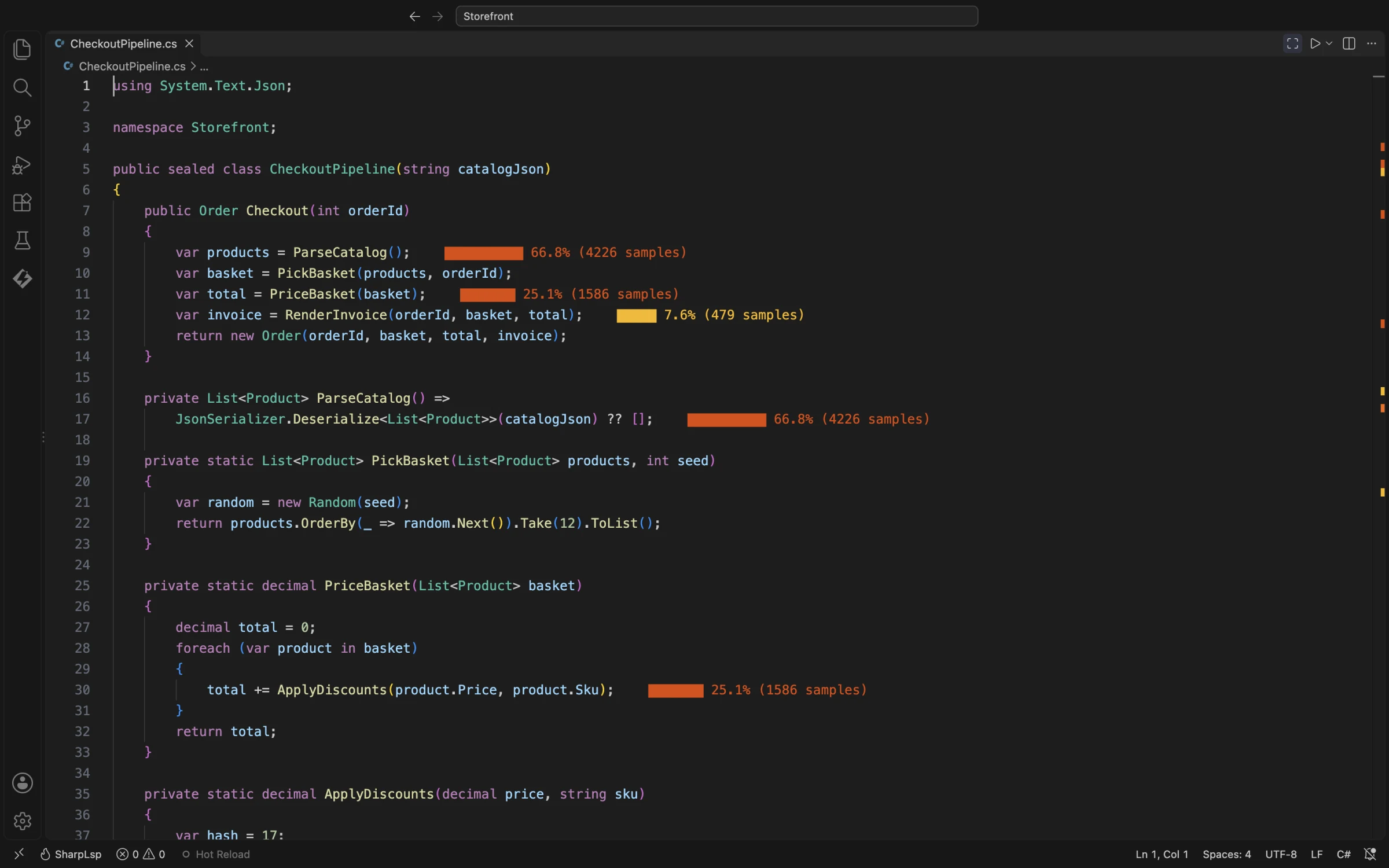
When the session stops, the results arrive in two places at once.
In the editor. Every hot line gets an inline heat bar with its share of samples. Bars run orange to amber by intensity, and the overview ruler marks each hot line so you can jump to it.
In the results panel. It shows the sample count, duration, function count and hot-line count, then a flame graph and a hot-function table with total and self percentages. Click a row to open its source location.
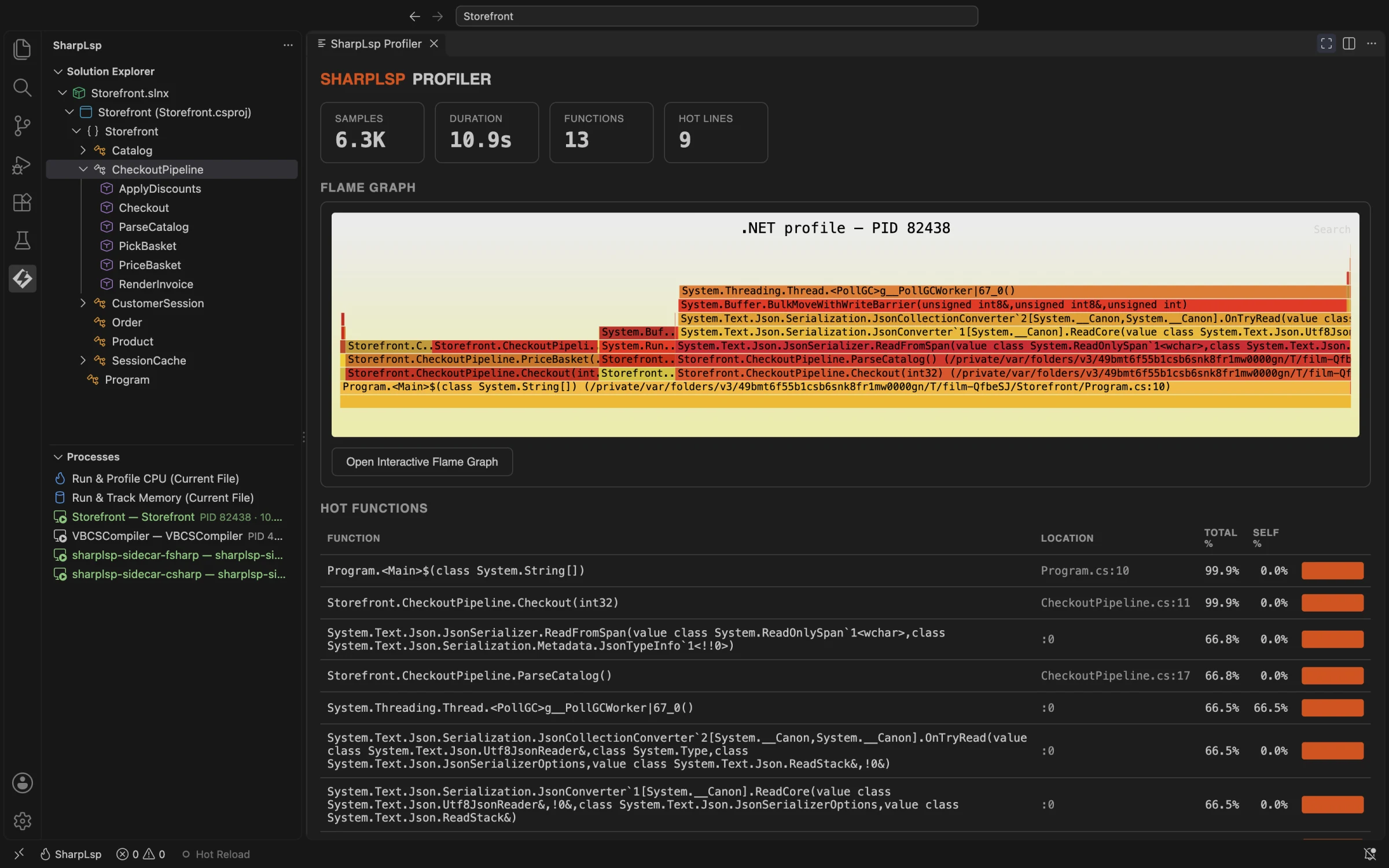
Open Interactive Flame Graph opens the full flame graph. Click a frame to zoom into its subtree.


ParseCatalog: the System.Text.Json deserializer is the cost.Each session also writes three exports under .sharplsp/profiles:
- a speedscope JSON;
- a
.cpuprofilethat VS Code's built-in profile viewer opens; - the flame graph SVG.
Memory Tracking
Click Track Memory on a row, or run SharpLsp: Start Memory Tracking. The SharpLsp Memory Dashboard opens beside your code. It shows:
- current and peak memory and the live object count;
- a heap timeline;
- the top allocation sites;
- ranked leak suspects.
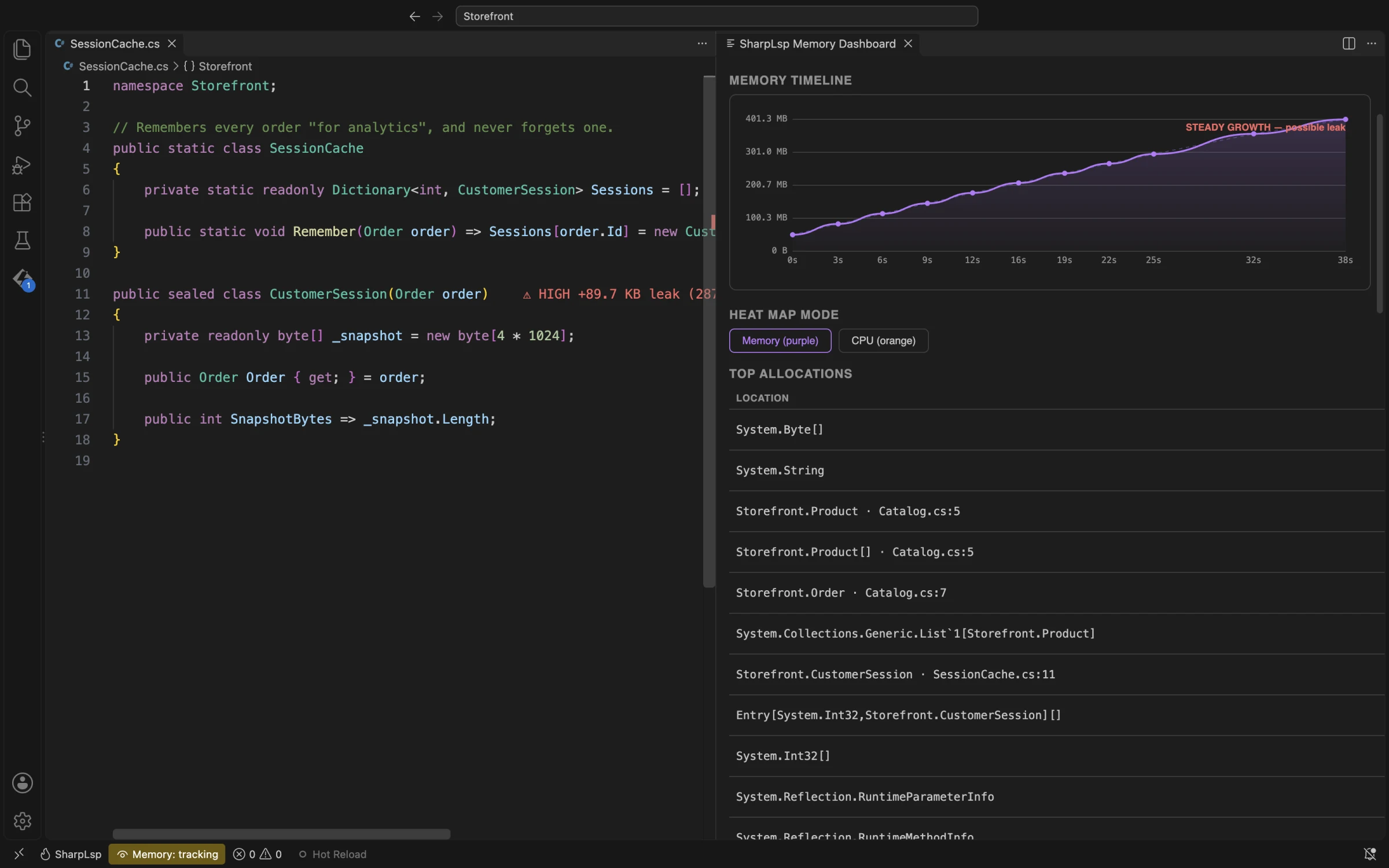
The memory autopilot takes and compares snapshots for you:
- every time the debugger pauses (
sharplsp.profiler.autoSnapshotOnPause, on by default); - every few seconds while the program runs (
sharplsp.profiler.autoSnapshot).
You can also drive snapshots by hand with Take Memory Snapshot, Compare Memory Snapshots and Force Garbage Collection.
Suspects are ranked by how consistently they grow. Each one shows its growth in bytes and objects and the number of consecutive snapshots it grew across. In the editor, each allocating type gets a purple heat bar on its declaration, and a suspected leak is flagged on the same line. Heat map mode on the dashboard switches the editor between memory (purple) and CPU (orange).
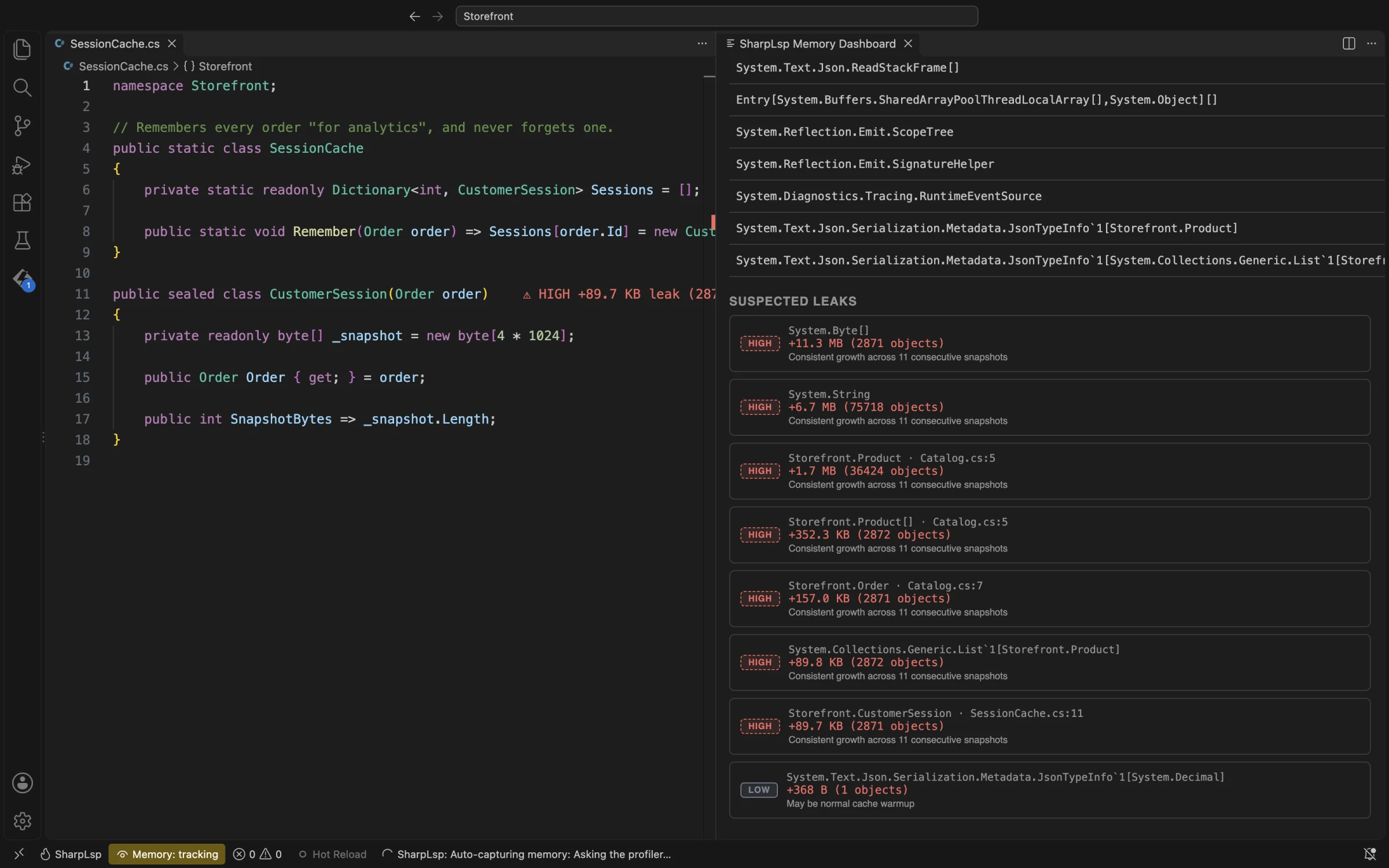
Dictionary that never evicts shows up as consistent growth in byte arrays, strings and the sessions that hold them.SharpLsp: Show Reference Graph draws the retention graph for a type: the objects that hold it and the roots that keep them alive. Heap growth is a heuristic, not proof of a leak, so confirm a suspect with its retention path and the app's behaviour.
F#
F# programs get the same profiler, and it reads the code the F# compiler emits. Closures and pipeline stages keep the names the compiler gives them, such as Pipe #1 stage #1 at line 11. Records, unions and union cases are painted on the line that constructs them. A leak held by a module value names that value as it is spelled in your source. Profiling F# shows the whole loop on an F# app, in a walkthrough video.
Commands
| Command | Purpose |
|---|---|
SharpLsp: Profile CPU / Track Memory |
Profile the process on the selected row |
SharpLsp: Run & Profile CPU (Current File) / Run & Track Memory (Current File) |
Launch the current project and profile it from the start |
SharpLsp: Start Profiling / Stop Profiling |
Start or stop a CPU session |
SharpLsp: Take Profile Snapshot |
See results so far without stopping |
SharpLsp: Show Profile Results |
Reopen the last results panel |
SharpLsp: Start Memory Tracking / Stop Memory Tracking |
Start or stop heap tracking |
SharpLsp: Take Memory Snapshot / Compare Memory Snapshots |
Capture and diff heap snapshots |
SharpLsp: Force Garbage Collection |
Collect before a snapshot |
SharpLsp: Show Reference Graph |
Show what keeps a type alive |
SharpLsp: Refresh Processes / Sort Processes / Group Processes / Filter Processes |
Organise the process list |
SharpLsp: Copy PID / Reveal Entry in Editor / Kill Process |
Process row actions |
Settings
| Setting | Default | Purpose |
|---|---|---|
sharplsp.profiler.sampleRate |
100 |
CPU sampling rate in Hz (1–1000) |
sharplsp.profiler.lineThreshold |
1 |
Minimum share of samples (%) for a hot line |
sharplsp.profiler.functionThreshold |
2 |
Minimum share of samples (%) for a hot function |
sharplsp.profiler.showInlineHeatMap |
true |
Paint heat bars on hot lines after profiling |
sharplsp.profiler.maxDiagnosticsPerFile |
20 |
Cap on profiling markers per file |
sharplsp.profiler.includeNative |
false |
Include native frames in results |
sharplsp.profiler.profileOnLaunch |
false |
Profile every SharpLsp debug session as it starts |
sharplsp.profiler.processRefreshMs |
2000 |
Processes view refresh interval |
sharplsp.profiler.autoSnapshotOnPause |
true |
Snapshot and compare whenever the debugger pauses |
sharplsp.profiler.autoSnapshot |
false |
Snapshot on a timer while memory tracking runs |
sharplsp.profiler.autoSnapshotInterval |
30 |
Seconds between timed snapshots |
The [profiler] table in sharplsp.toml sets the output directory (default .sharplsp/profiles) and the hotspot thresholds. See Configuration.