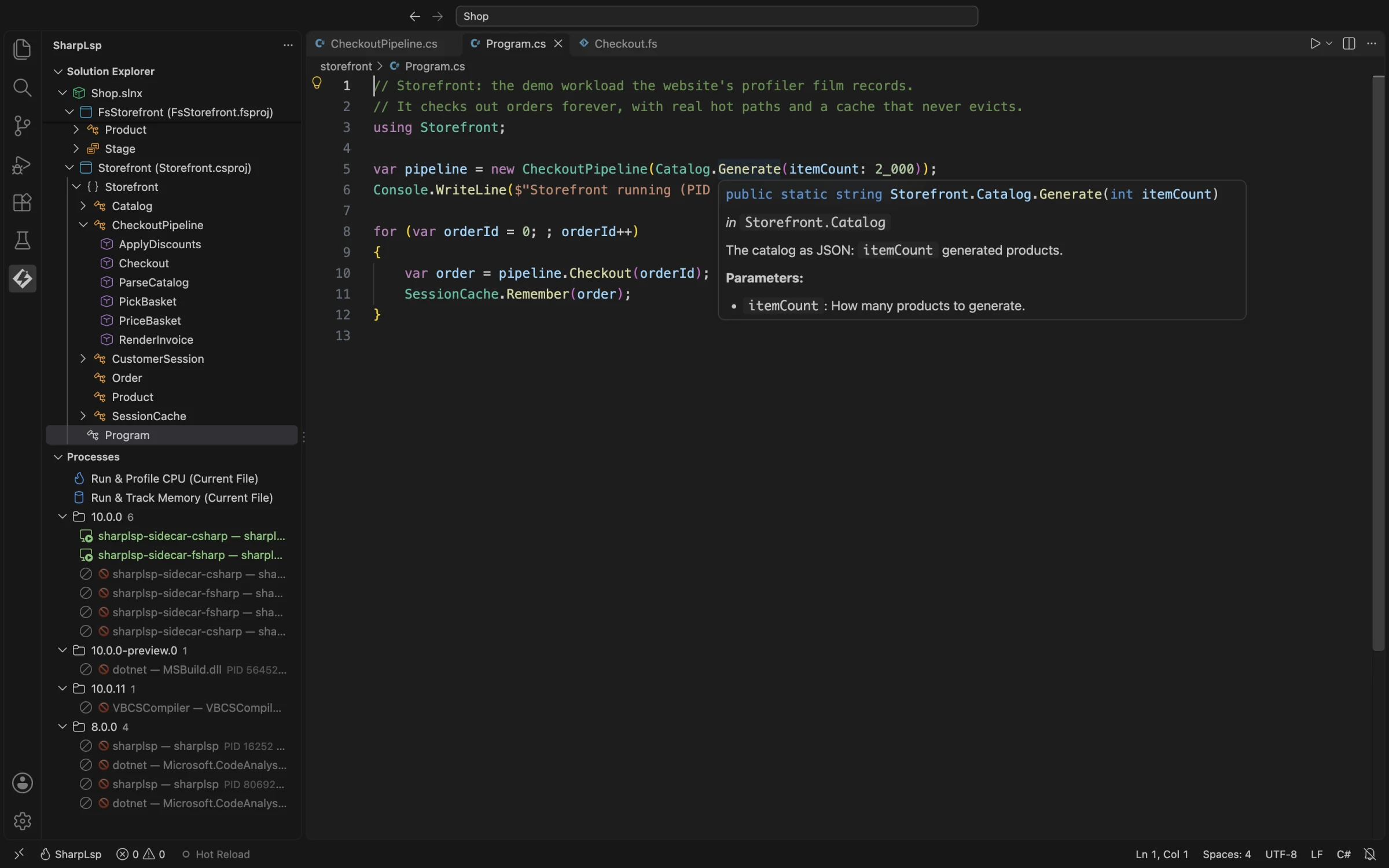
Hover in VS Code

C# hover information in the alpha VS Code extension.

Hover and Quick Info

Hover over C# symbols to see type signatures and documentation from the Roslyn sidecar. F# hover support is part of the SharpLsp direction, but the current website screenshots reflect the VS Code extension's active alpha state.

What You See

When you hover a symbol, SharpLsp returns a Markdown-rendered tooltip containing:

Section Content
Signature Fully qualified symbol signature with syntax highlighting
Containing type ContainingType.Name for members
XML documentation <summary>, <param>, <returns>, <remarks>, <example>
Exceptions <exception> tags from XML docs
Nullability Nullable annotation state
Accessibility public, internal, protected, etc.
Deprecation [Obsolete] message with warning

C# Hover (Roslyn)

The C# sidecar resolves symbols via SemanticModel.GetSymbolInfo() and renders XML documentation from three sources in priority order:

  1. Source code /// comments
  2. XML documentation files from NuGet packages (.xml files alongside assemblies)
  3. Roslyn's built-in documentation provider

Special Cases

Hover Target Behavior
var keyword Shows the inferred type with full signature
await expression Shows the unwrapped Task<T> return type
nameof(Foo) Shows the referenced symbol
String literals Returns null (no tooltip)
Lambda parameters Shows inferred parameter types
Tuple elements Shows element names and types
Pattern variables Shows the pattern-matched type
[Obsolete] members Shows deprecation message

Example

var result = Enumerable.Range(0, 10).Select(x => x * x).ToList();
//           ↑ hover shows:
// IEnumerable<int> Enumerable.Range(int start, int count)
// Generates a sequence of integral numbers within a specified range.
// Parameters:
//   start: The value of the first integer in the sequence.
//   count: The number of sequential integers to generate.

F# Hover

F# hover is part of the SharpLsp roadmap and sidecar architecture. The current website does not present it as beta-ready.

Solution Explorer Hover

The Solution Explorer tree view uses the same hover pipeline as the code editor. When you hover a symbol in the tree, the tooltip is identical to the one shown in the code editor.

Tree Node Type Tooltip Source
Symbol (class, method, property, etc.) LSP hover --- same as code editor
Namespace LSP hover --- same as code editor
NuGet Package Package name + version
Project Reference Reference name

Caching

Hover results are cached by the Rust host via salsa incremental computation.

Cache Key Invalidated When
(document_uri, document_version, position) Document is edited

A cache hit returns in under 1ms. Stale hover requests for superseded document versions are cancelled immediately.

Performance Targets

Metric Target
Hover latency (p50) <150ms
Hover latency (p95) <300ms
Cached position <1ms
Tree-sitter pre-validation (skip whitespace) <1ms

Error Handling

Hover never returns errors or blocks the editor. On any failure β€” sidecar not ready, symbol resolution failure, IPC timeout β€” SharpLsp returns null (no tooltip). Sidecar crashes trigger automatic recovery within 3 seconds.