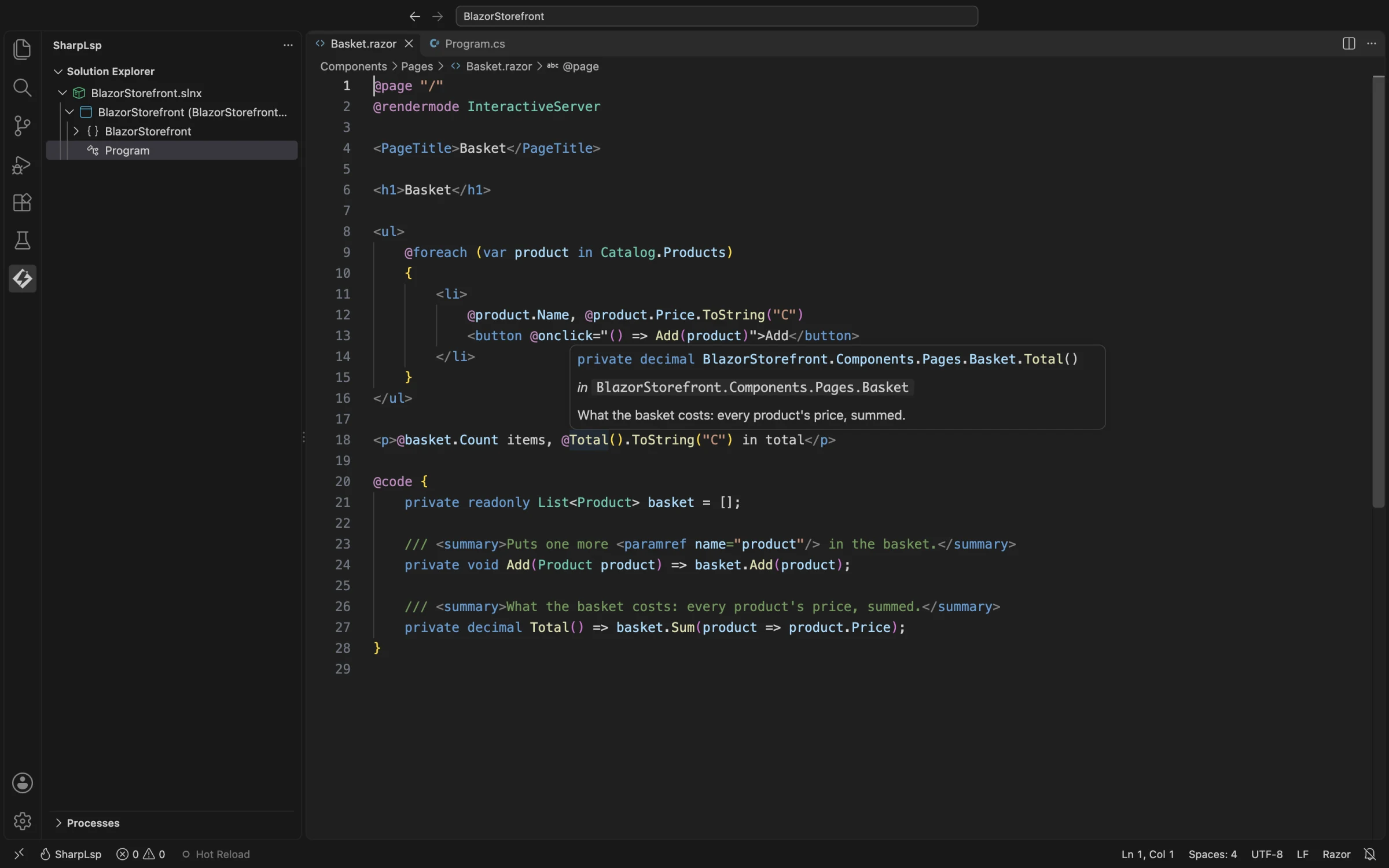
Blazor and Razor
SharpLsp edits Razor files in VS Code with the same Roslyn engine it uses for C#. That covers Blazor components (.razor), and ASP.NET Core Razor Pages and MVC views (.cshtml).
The C# inside the markup gets hover, completion, diagnostics, navigation and rename: @ expressions, @code blocks, event handlers and @bind values. The HTML around it gets your editor's HTML support.
What Works in a Razor File
| Feature | What you get |
|---|---|
| Hover | Roslyn's hover for the C# under the cursor, with its signature and XML documentation, ranged on the Razor text |
| Completion | Roslyn completion inside @ expressions and @code blocks. Every edit lands in the Razor file, and a using that completion adds becomes an @using line |
| Signature help | Parameter help inside a call |
| Diagnostics | C# errors and warnings on the Razor line that caused them, and Razor files in the solution-wide scan |
| Go to definition | From markup to the declaration, such as a method in the @code block. From C#, a component's definition is its .razor file: MapRazorComponents<App>() goes to App.razor |
| References and highlights | Every use in your Razor files. The compiler's hidden scaffolding is left out |
| Rename | A field or member of the @code block, renamed at every use in the markup. Rename refuses on plain markup |
| Semantic highlighting | Roslyn's classification for the C# in the file. The editor's Razor grammar colors the markup |
| Folding and outline | Multi-line elements and @code blocks fold. The outline lists directives and elements, with the members of each @code block nested under it |
| Linked editing | In a component, a start tag and its end tag rename together |
Results never point into generated code. A position in a file's generated C# always maps back to its Razor file.
Razor files never report a using as unnecessary. Markup resolves component tags through usings that the generated C# never needs, and the usings in _Imports.razor and _ViewImports.cshtml serve the files beside and below them. C# files, including a component's .razor.cs code-behind, still report them.
HTML in the Markup
- VS Code: element and attribute completion, and HTML hovers, come from VS Code's built-in HTML language service. SharpLsp forwards the request with an HTML view of the file, the pattern VS Code's Embedded Programming Languages guide describes. Its own items come first.
- Zed: Zed has no built-in Razor language. Install a Razor extension from Zed's extension registry, and SharpLsp attaches to the
Razorlanguage it defines. - Other LSP clients: the language id is
razor, for.razorand.cshtmlfiles. Pair SharpLsp with an HTML language server for the markup.
How It Works
SharpLsp never reimplements Razor. Since .NET 6, the Razor compiler runs as a Roslyn source generator, and the C# sidecar's design-time build runs it exactly as dotnet build does.
The generator turns each Razor file into C#. It copies every C# fragment into the generated file verbatim, and wraps it in an enhanced #line directive that points back at the Razor text.
SharpLsp builds a two-way map from those directives, checking each fragment's text on both sides:
- A request at a Razor position maps to the generated C#.
- Roslyn answers there, exactly as it would for a
.csfile. - Each answer maps back to the Razor file.
Positions in the compiler's hidden scaffolding have no Razor text, so they never reach you.
flowchart LR
  razor["Basket.razor"] -- "Razor source generator" --> generated["Generated C#<br/>with #line mappings"]
  generated --> roslyn["Roslyn: hover, completion,<br/>references, rename"]
  roslyn -- "mapped back" --> razor
The markup comes from the compiler's public intermediate representation. It drives folding, the outline and linked editing, and it builds the HTML view that VS Code's HTML service reads.
Supported Projects
| File | What it is |
|---|---|
*.razor |
A Razor component |
_Imports.razor |
Directives for every component in its folder and below |
*.cshtml |
A Razor Page (@page), MVC view, partial view or layout |
_ViewImports.cshtml |
Directives for every page and view in its folder and below |
_ViewStart.cshtml |
Code that runs before each view |
- Apps: a Blazor Web App (
dotnet new blazor) with Blazor Server or Blazor WebAssembly render modes, a standalone Blazor WebAssembly app, a Razor Pages or MVC app, and a Razor class library of shared components. - Project SDKs:
Microsoft.NET.Sdk.Web,Microsoft.NET.Sdk.BlazorWebAssemblyandMicrosoft.NET.Sdk.Razor. - Verified: ASP.NET Core 10 on the .NET 10 SDK, including a fresh
dotnet new blazorapp. - net8.0 and net9.0: these projects compile Razor through the same source generator, so they should work, but they are not verified yet.
- Not supported: projects older than .NET 6, which compile Razor without a source generator, and ASP.NET MVC 5, Web Pages and Web Forms on .NET Framework.
SDK Versions
The Razor generator comes from the SDK that builds your project. When no global.json pins one, that is the newest SDK you have installed.
Roslyn only loads a generator built for its own version or an older one, and a newer SDK's generator can need a newer Roslyn than the one SharpLsp bundles. SDK 10.0.401's does. SharpLsp then loads the Razor compiler it bundles in that generator's place, so the project's Razor files keep their C# features, and it logs a warning that names both Roslyn versions (issue #399). Your own builds still use the SDK's generator.
Not Yet Supported
Progress is tracked in issue #397.
- Component markup: hover, definition, completion, references and semantic colors on component tags, component parameters,
@bind-X, and directive attributes such as@onclick. - Razor diagnostics: the compiler's own
RZdiagnostics, such as an unknown component. - Tag helpers: hover and completion for tag helper elements and attributes such as
asp-for. - F#: Razor's code language is C#, because the Razor compiler generates only C#, but a Blazor app can reference F# libraries. Hover, completion and definition on F# types used from Razor, and F# renames that reach Razor usages, are planned.
- Editing: formatting, selection ranges, code actions, inlay hints, code lens, and call and type hierarchy from Razor positions.
- Collocated files: awareness of CSS isolation (
.razor.css) and collocated.razor.jsfiles. - Runtime: Blazor WebAssembly debugging and Hot Reload.
Failure Behavior
- No projection: if a project does not run the Razor generator, its Razor files have no C# features. Their markup features still answer.
- Engine failure: if the Razor engine fails to load or to process a file, markup features answer empty and C# features keep working. SharpLsp logs the failure once per project, with the project name and the exception type.
- Nothing at the position: a position that is neither C# nor a markup element answers nothing, never an error.
- Privacy: SharpLsp never logs Razor or generated text, only paths, spans and lengths.