Refactoring and Code Actions
Code actions turn a problem into code. This lesson covers the shortcut, where actions come from, the F# fixes, rename, and the C# fixes. It ends with what happens underneath, and what is not a code action. Everything here works the same on macOS, Linux and Windows.
You will learn to:
- open the code action menu from the keyboard;
- predict which actions the menu offers, and why;
- complete an F# match, and use the F# quick fixes by diagnostic;
- rename a symbol across files;
- generate a C# method from a call, and add a missing
using; - tell what SharpLsp does when you pick an action.
Before you start: install SharpLsp (Editor Setup) and open a folder with a solution or project. Code actions need the project loaded, because the C# and F# compilers produce them.
Step 1: Open the Menu
Every action starts from one command, Quick Fix:
| Where | How |
|---|---|
| VS Code on macOS | Cmd+. |
| VS Code on Windows and Linux | Ctrl+. |
| Any editor | Click the lightbulb in the gutter |
Other editors expose the same LSP request under their own code action command. SharpLsp serves textDocument/codeAction to all of them.
Step 2: Know Where Actions Come From
Actions are context-dependent. The sidecar returns only the fixes and refactorings whose compiler or provider can act on what is under the cursor:
| Context | What you get |
|---|---|
| A diagnostic (a warning or error) | The fix for that diagnostic |
| The cursor on a type, member or expression | Refactorings that reshape it |
| A selection | Refactorings that work on that span |
| A blank line, or an unsupported spot | No actions. SharpLsp never guesses |
So when the menu you expect is missing, move the cursor onto the squiggle or the symbol, or select the code, and ask again.
Step 3: Complete an F# Match
Try this in any F# project. Declare a union and a match that misses a case:
type Stage =
    | Browsing
    | CheckedOut of decimal

let describe stage =
    match stage with
    | Browsing -> "still browsing"
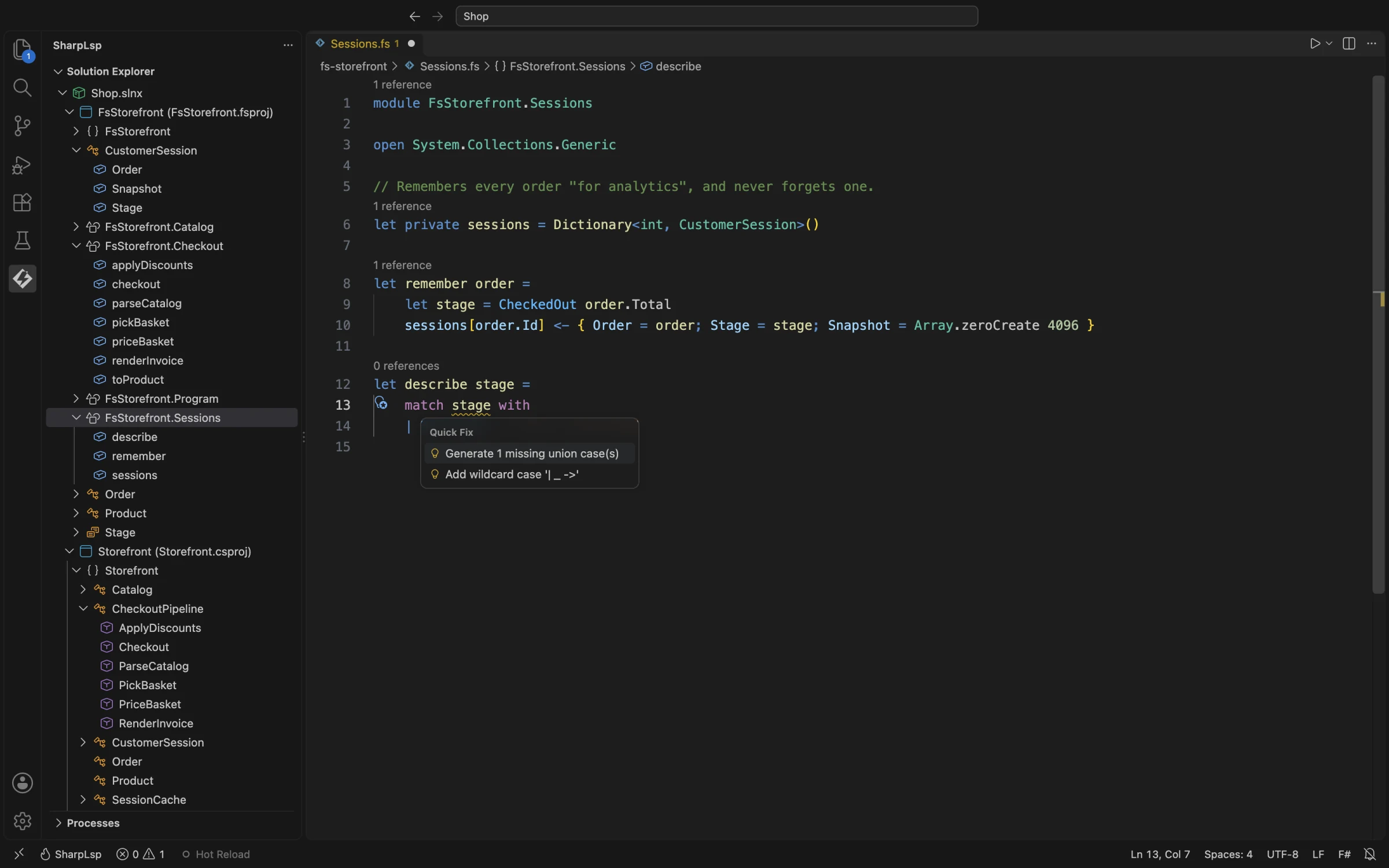
The compiler underlines stage with FS0025: an incomplete pattern match. Put the cursor on it and press Cmd+.. The menu offers two fixes:
- Generate 1 missing union case(s) writes an arm for each missing case;
- Add wildcard case adds a catch-all
| _ ->arm instead.
Pick Generate:
let describe stage =
    match stage with
    | Browsing -> "still browsing"
    | CheckedOut _ -> failwith "todo"
The F# compiler knows every case of the union, so the arm is exact. You replace failwith "todo" with the body.
Step 4: The F# Fixes by Diagnostic
Each F# fix is tied to a compiler diagnostic, or to the code under the cursor:
| Trigger or context | Action |
|---|---|
FS0039 |
Add a resolving open when a namespace can be identified |
FS1182 |
Prefix an unused binding with _ |
FS0020 |
Add ` |
FS0025 |
Add a wildcard match arm |
FS0026 |
Remove a redundant pattern |
supported FS0001 mismatches |
Insert a known conversion |
| discriminated-union match | Generate missing cases |
| record expression | Generate missing fields |
| interface implementation | Generate member stubs |
SLSPF0102 / SLSPF0103 |
Remove an unused open / simplify a name |
The F# compiler reports FS1182 only when the project turns the warning on, for example with <OtherFlags>--warnon:1182</OtherFlags> in the project file.
Try it: write List.map (fun x -> x + 1) [1; 2] on a line of its own. The compiler warns FS0020, because the result is thrown away. Cmd+. offers |> ignore.
Compiler typo fixes and some FSAC actions are not implemented yet; see F# Language Support.
Step 5: Rename Across Files
Rename is not a code action. Put the cursor on a symbol and press F2 (Rename Symbol), type the new name, and press Enter. SharpLsp advertises textDocument/prepareRename, so the editor knows up front whether the symbol can be renamed, then textDocument/rename edits every reference:
- C# rename uses the loaded Roslyn solution;
- F# rename uses the loaded F# project, and edits every file that uses the symbol.
In the lesson, renaming the F# function remember to rememberOrder in Sessions.fs also rewrites its call in Program.fs.
Step 6: Generate a C# Method From a Call
The C# sidecar discovers Roslyn's code-fix and refactoring providers from the bundled Roslyn feature assemblies, so the C# fixes are Roslyn's own. A useful habit is to write the call first:
var receipt = Receipt(invoice);Receipt does not exist yet, so the compiler reports an error. Cmd+. on it offers Generate method 'Receipt', and Roslyn writes the stub, with the parameter type taken from the call:
private object Receipt(string invoice)
{
    throw new NotImplementedException();
}
Step 7: Add a Missing using
Use a type without its namespace:
var builder = new StringBuilder();Cmd+. on StringBuilder offers using System.Text; first. Further down, it offers the fully qualified name, generating a new StringBuilder class, and other Roslyn refactorings for the spot, such as converting to a block-scoped namespace.
Other verified C# actions include removing an unused local, and Roslyn refactorings for a valid type or selection. The exact list varies with syntax, diagnostics, the Roslyn version and the available providers. The presence of a category does not mean every Visual Studio refactoring is available.
Under the Hood: List, Then Resolve
A code action takes two requests:
- Ask. The editor sends
textDocument/codeActionfor the cursor or selection. - List. The sidecar (Roslyn for C#, the F# compiler for F#) returns lightweight items: titles and kinds, without edits. That keeps the menu fast.
- Resolve. When you pick one,
codeAction/resolvecomputes the edits for that action alone. - Apply. The result is one workspace edit, which can change several existing documents at once.
If an action has expired, the sidecar has restarted, or the provider cannot produce an edit, resolve returns no edit instead of guessing.
What Is Not a Code Action
- Formatting. SharpLsp intentionally does not advertise LSP formatting. Use CSharpier for C# and Fantomas for F#.
- Sort Members. A separate C# command, built on tree-sitter. Right-click a C# type in the Solution Explorer and pick Sort Members; it orders members by accessibility, category and name, as configured.
- Rename.
F2, as in step 5.
Recap
Cmd+.(orCtrl+.) opens every action that applies to the cursor, selection or diagnostic.- F# fixes follow compiler diagnostics, and can write whole match cases, record fields and interface stubs.
F2renames across files, in F# and C#.- In C#, call first and generate second.
The Walkthrough in One Take
The same features, recorded in one continuous take in VS Code: