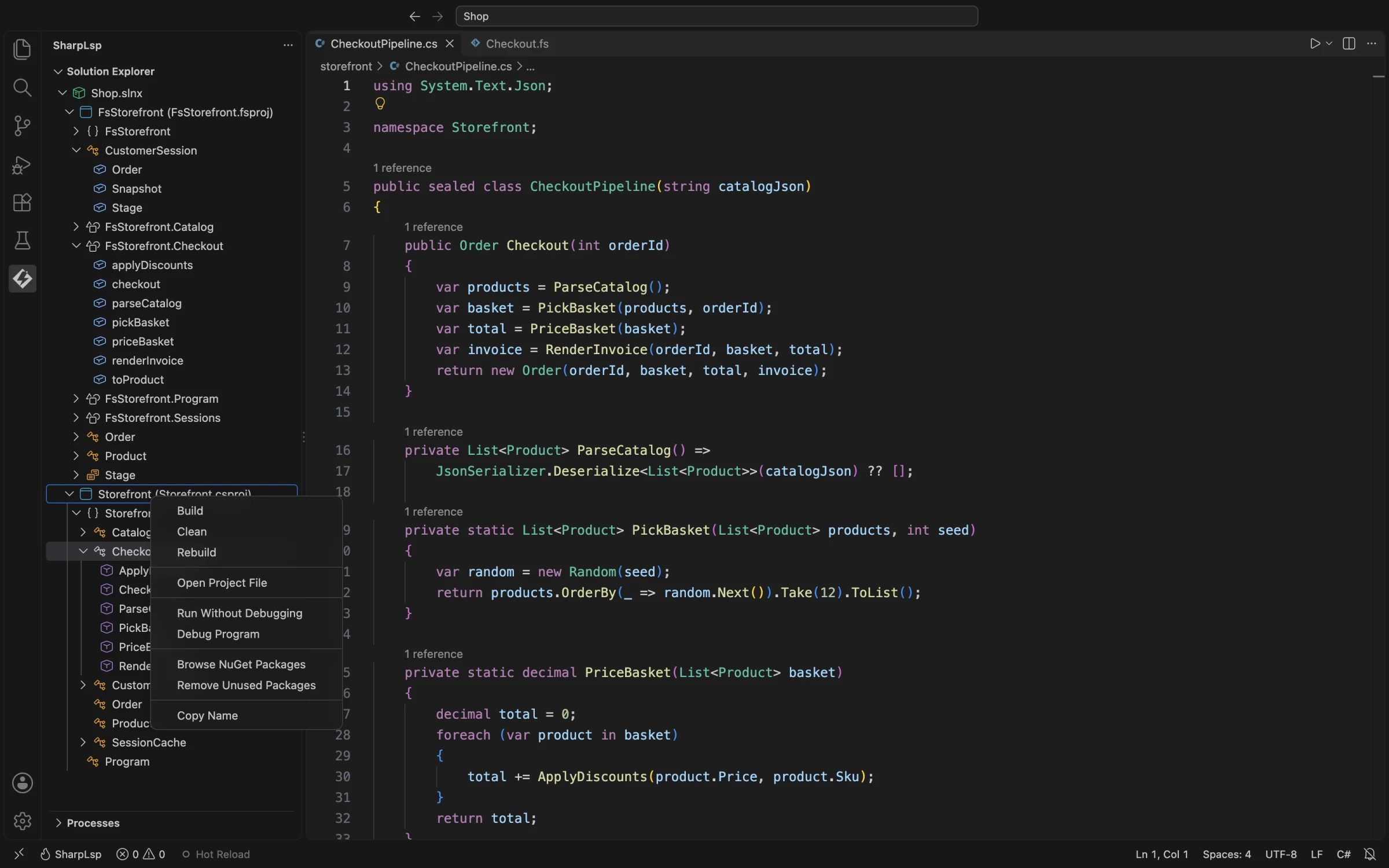
Context Menus
Most SharpLsp context-menu commands belong to the VS Code Solution Explorer. The extension does not currently add a Problems-panel context menu.
Solution Explorer
| Node | Available actions |
|---|---|
| Solution | Build, Rebuild, Clean, Remove Unused Packages, Consolidate Packages, Copy Name |
| Project | Open Project File, Build, Rebuild, Clean, Browse NuGet Packages, Remove Unused Packages, Copy Name |
| Dependency folder | Add Project Reference, Add NuGet Package |
| NuGet package | Remove Package |
| Project reference | Remove Project Reference |
| Type symbol (C#) | Sort Members, Reveal in Explorer, Copy Qualified Name, Copy Name |
| Other source symbol | Reveal in Explorer, Copy Qualified Name, Copy Name |
Build, Rebuild, and Clean
The commands target the selected solution or project:
- Build:
dotnet build <target> - Rebuild:
dotnet build <target> --no-incremental - Clean:
dotnet clean <target>
Build output is shown in a terminal, and parsed compiler errors and warnings are added to VS Code diagnostics.
Open Project File
Opens the selected .csproj or .fsproj in the editor.
Add Project Reference
This action appears on a project's dependency-folder node. It shows a quick-pick list of other discovered projects, then edits the project reference.
NuGet Actions
Browse NuGet Packages opens the NuGet Package Manager with the selected project as its target. Dependency and package nodes also expose add, remove, unused-package, and consolidation workflows where applicable.
Symbol Actions
- Copy Qualified Name copies a source symbol's fully qualified name.
- Copy Name copies the short name; it is also available for project and solution nodes.
- Reveal in Explorer reveals the symbol's source file.
- Sort Members operates on C# class, struct, interface, enum, and record nodes. It follows the configured accessibility/category/alphabetical hierarchy rather than always sorting by name alone.
Editor Menu
For C# and F# editors, SharpLsp contributes Debug Program. Code actions, rename, navigation, and other language operations use VS Code's standard LSP menus and commands rather than SharpLsp-specific context entries.