Profiling F#
SharpLsp's profiler attaches to the .NET runtime, not to a language, so an F# program gets everything a C# program gets: heat bars on hot lines, a flame graph, a live heap timeline and ranked leak suspects. It also understands the code the F# compiler emits:
- Closures and pipeline stages keep the names the compiler gives them, so a hot stage points at its line.
- Records, unions and union cases anchor on the line that constructs them, because the members the compiler generates for them have no source lines of their own.
- A leak held by a module value names that value as it is spelled in your source.
Here is the whole loop on FsStorefront, the F# twin of the C# Storefront demo, recorded in VS Code. Fast-forwarded stretches are marked on screen:
FsStorefront checks out orders forever: it parses a CSV catalog, picks a basket, prices it and renders an invoice with sprintf. It also keeps every customer session in a module-level Dictionary that nothing ever empties.
CPU profiling F# code
Hover your app's row in the Processes view and click Profile CPU, or run SharpLsp: Start Profiling. Let the slow path run, then click Stop Profiling. Every hot line in your .fs files gets a heat bar with its share of the samples.
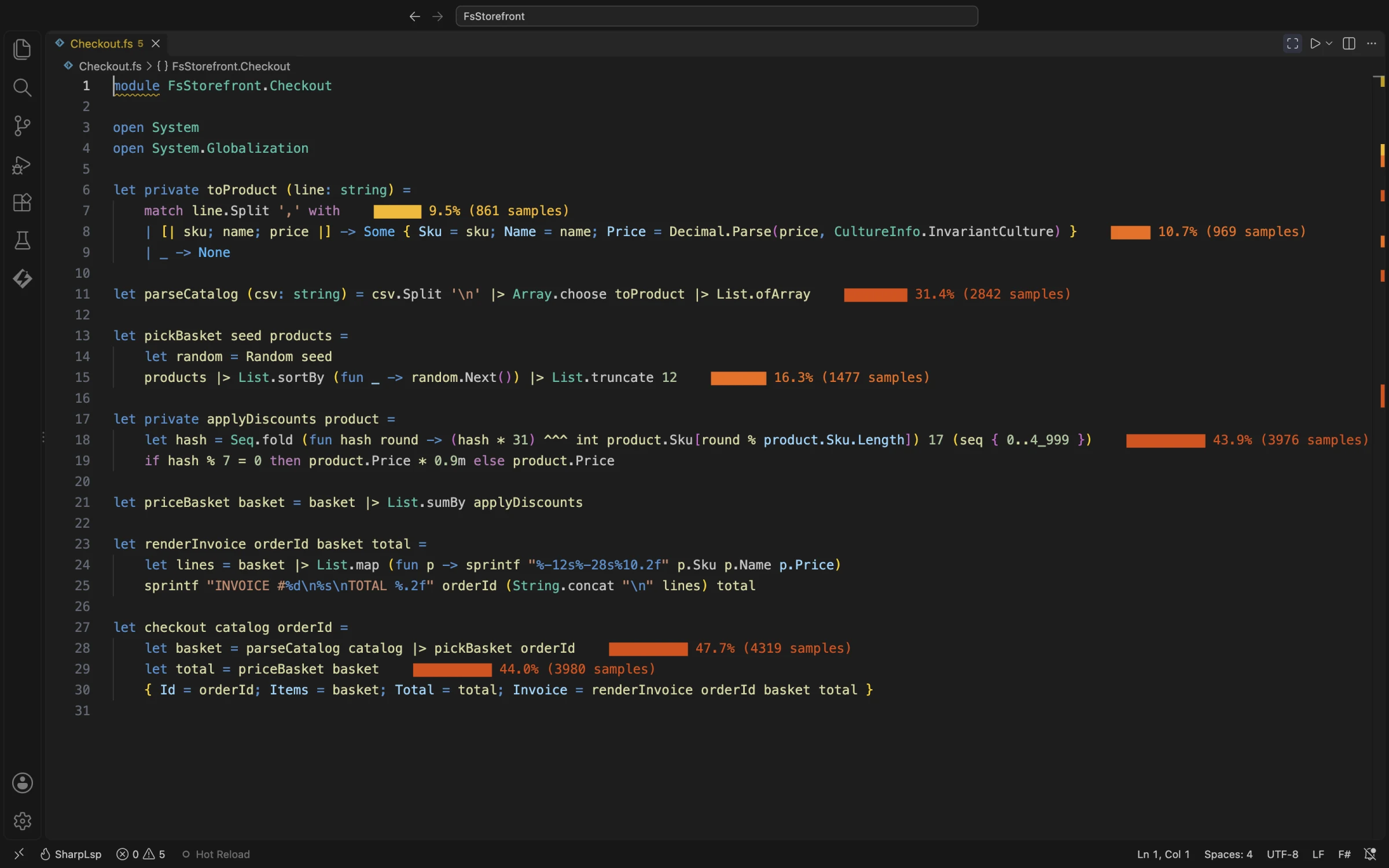
Checkout.fs. The hot lines are the CSV parsing pipeline, the basket shuffle and the discount fold.The results panel and the flame graph name each frame as the compiler emitted it:
| In your F# code | In the results |
|---|---|
A module function, let toProduct line = … |
FsStorefront.Checkout.toProduct: the namespace, the module, then the function |
A lambda, fun p -> sprintf … on line 24 |
Checkout+lines@24.Invoke: the value it is bound to and its line |
A stage of a pipeline, … |> Array.choose toProduct on line 11 |
Checkout+Pipe #1 stage #1 at line 11@11.Invoke |
An inline function |
No frame: the compiler copies its body into each caller, so its time is the caller's |
List.map, Seq.fold and the rest of FSharp.Core |
Microsoft.FSharp.Collections.ListModule.Map, and so on |
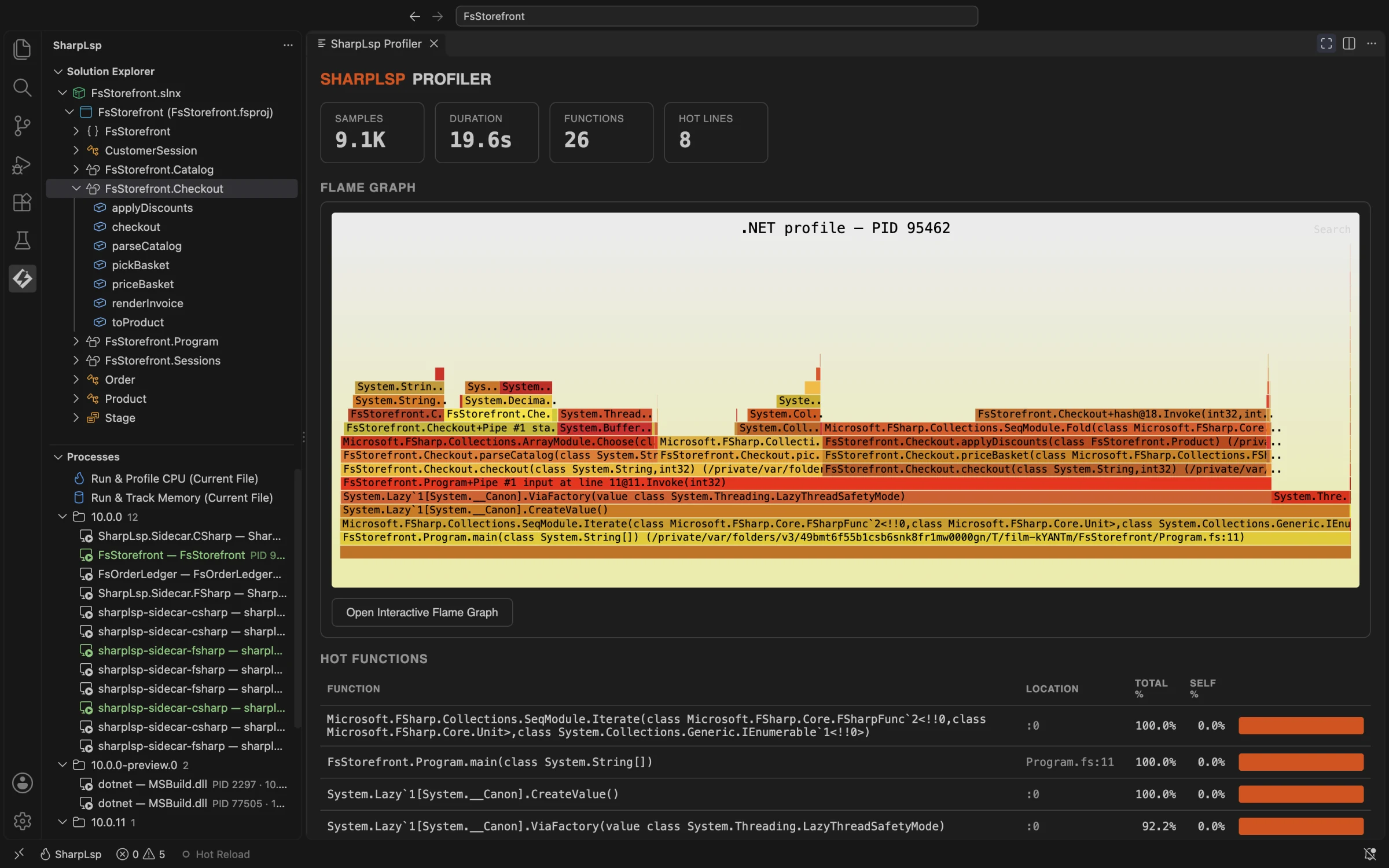
Profile the build you ship. A Debug build keeps a frame for every call. A Release build inlines small functions, and the F# compiler emits tail calls, so a function that ends by calling another can be missing from the stack beneath it.
Memory profiling F# code
Click Track Memory on the row, or run SharpLsp: Start Memory Tracking. The SharpLsp Memory Dashboard opens beside your code with the heap timeline, the top allocation sites and the leak suspects. Turn on timed snapshots with sharplsp.profiler.autoSnapshot, and the dashboard ranks suspects as they grow.
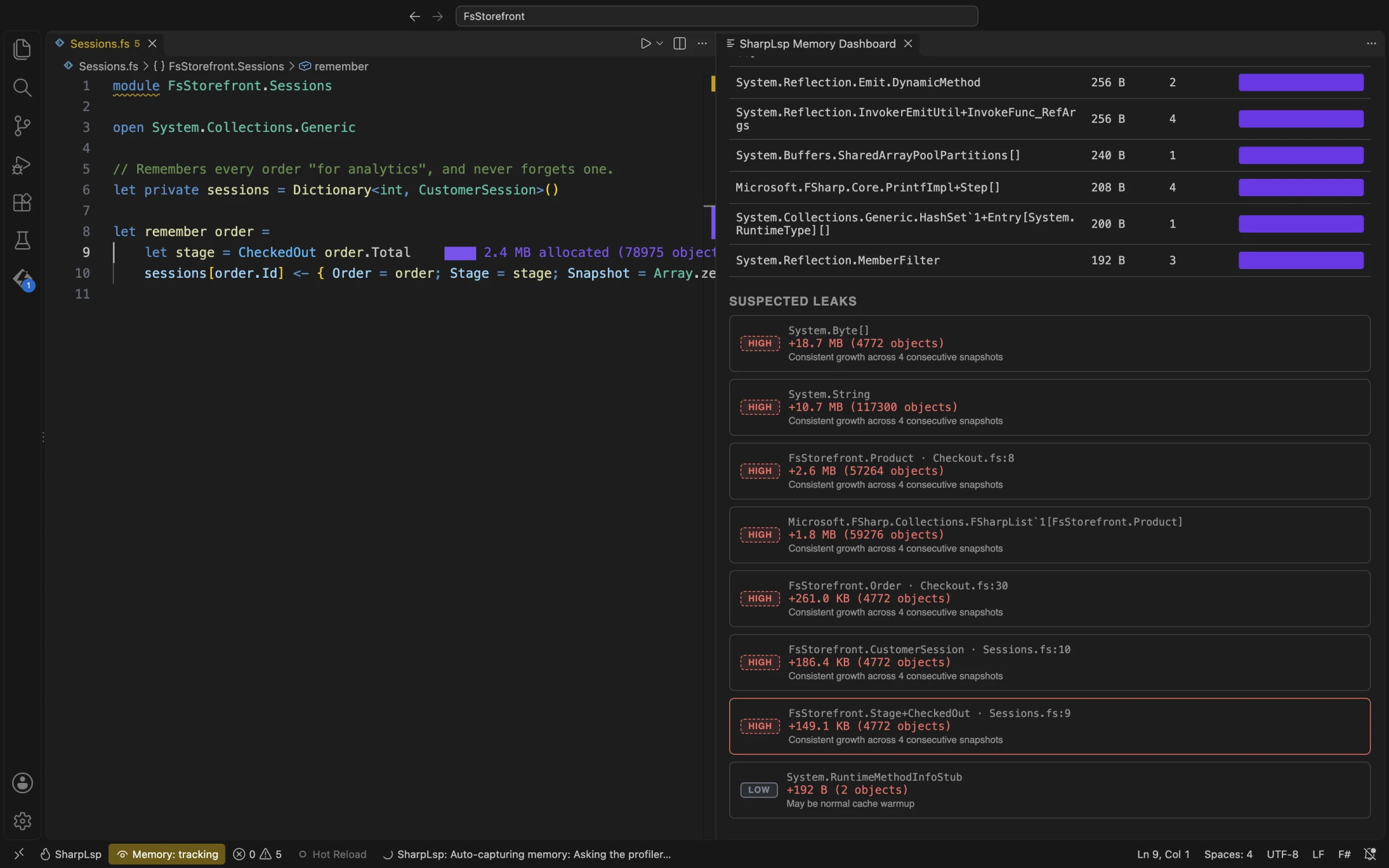
Sessions.fs that build them.Where an F# type is painted
A C# class is painted on its declaration. Every member the F# compiler generates for a record or a union has no source line, so SharpLsp paints those types on the line in your program that constructs them:
| Type | Where it is painted | Name in the dashboard |
|---|---|---|
A record, { Order = order; Stage = stage; … } |
The line that builds it | FsStorefront.CustomerSession |
A union case with fields, CheckedOut order.Total |
The line that builds it | FsStorefront.Stage+CheckedOut: each case with fields is a class nested in its union |
A single-case union, CustomerId 42 |
The line that builds it | FsStorefront.CustomerId |
| A generic record | The line that builds it | Closed over its arguments, such as Tagged`1[System.Int32] |
| A closure or an anonymous record | The line that builds it | Its compiled name |
| A class with members of its own | Its first member | FsStorefront.PriceTicker |
A struct record or a struct union ([<Struct>]) |
Nowhere: it is stored inside the object that holds it, so it never appears on its own | Not listed |
A union case without fields, such as Browsing |
Nowhere: every use shares one instance, so it never grows | Not listed |
| An array, an F# list, and other FSharp.Core and framework types | Nowhere: they have no source in your project | By name, such as FSharpList`1[FsStorefront.Product] |
Click a suspect on the dashboard to jump to its line.
What keeps it alive: module values
Run SharpLsp: Show Reference Graph and pick the suspect's type to see the objects that hold it and the root that keeps them alive. A module value such as let private sessions = Dictionary<int, CustomerSession>() compiles to a static field named after its line, sessions@6. The graph labels the root static sessions, as you wrote it.
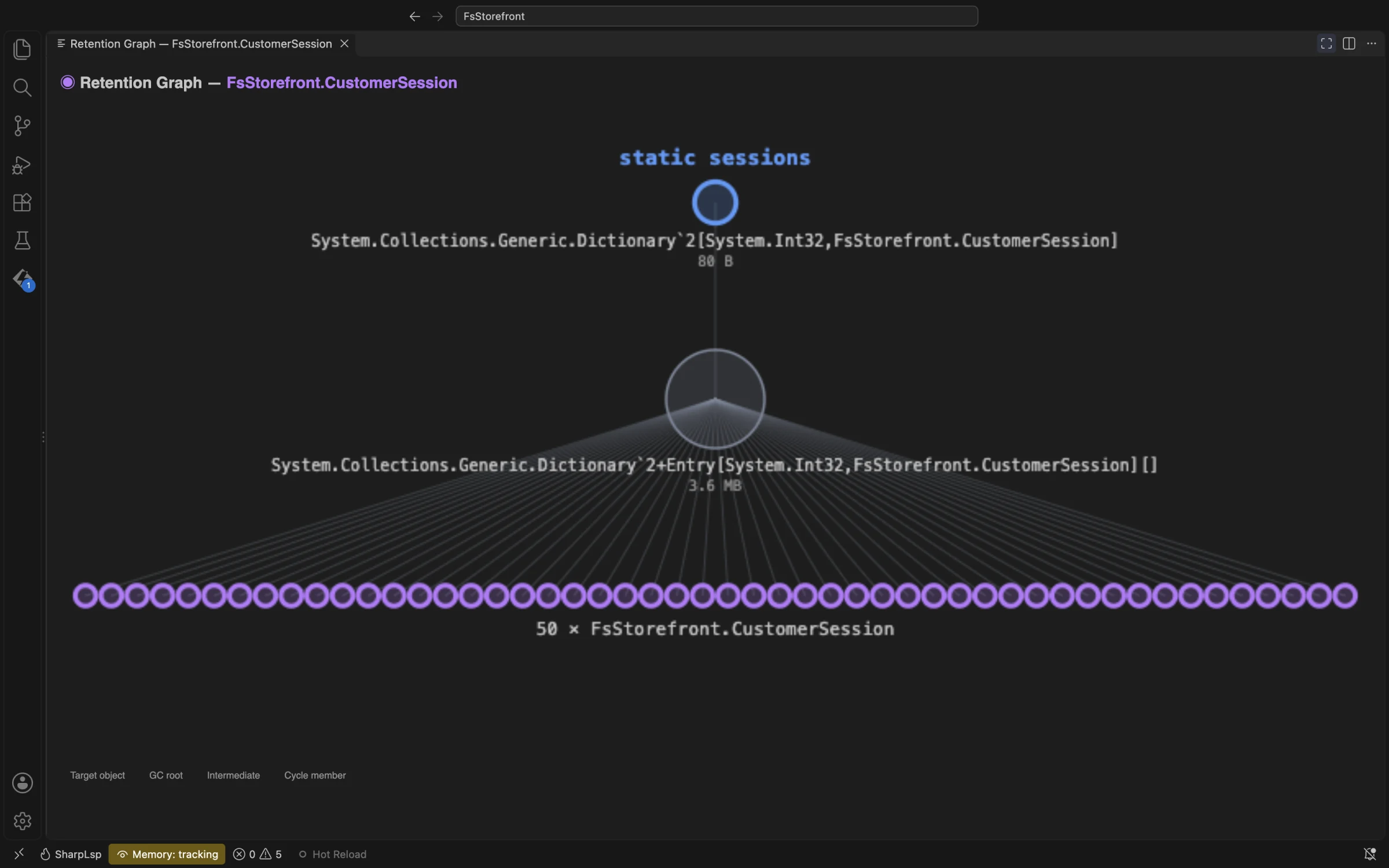
CustomerSession hangs off one Dictionary, rooted at the module value sessions.FsStorefront only needs recent sessions, so the fix keeps a window of the last 1,000:
// Remembers the last 1,000 orders "for analytics", and forgets older ones.
let private sessions = Dictionary<int, CustomerSession>()

let remember order =
    let stage = CheckedOut order.Total
    sessions[order.Id] <- { Order = order; Stage = stage; Snapshot = Array.zeroCreate 4096 }
    sessions.Remove(order.Id - 1_000) |> ignore
Rebuilt and tracked again, the heap levels off and no suspect climbs past Low. How to Fix a Memory Leak walks through the whole loop, with F# fixes for event handlers and closures and an F# leak test.
Related
- Profiler: every profiler command and setting
- How to Fix a Memory Leak: the leak loop step by step, in C# and F#
- F# Language Support: everything else SharpLsp does for F#